>
How to >
>
How to >
Unblocked YouTube: 10 Proven Methods to Watch YouTube at School
YouTube as a video sharing platform for entertainment, education and information has earned a wide popularity worldwide. However, not everyone can watch YouTube as they want, just like you who are searching for unblocked YouTube right now.
This ultimate guide will explain 10 tested methods to help students watch YouTube unblocked at school, and the tricks to watch YouTube unblocked on restricted iOS devices. From different unblocked YouTube websites to high-quality YouTube alternatives, we let you enjoy smooth streaming anywhere. Read to pick one method that best suits you!

- Why YouTube Gets Blocked
-
- Unblocked YouTube 1: Modify YouTube URL
- Unblocked YouTube 2: Unblocked YouTube Sites

- Unblocked YouTube 3: VPN
- Unblocked YouTube 4: Tor Browser
- Unblocked YouTube 5: Browser Extension
- Unblocked YouTube 6: Smart DNS
- Unblocked YouTube 7: Google Translate
- Unblocked YouTube 8: Mobile Hotspot
- Unblocked YouTube 9: Download YouTube Videos for Offline Viewing
- Unblocked YouTube 10: Watch YouTube Alternatives
- How to Watch YouTube Unblocked on A Restricted iPhone or iPad
- FAQs About Unblocked YouTube
Why YouTube Gets Blocked
YouTube gets blocked due to government censorship, geographical restrictions, copyright issues, network firewalls, etc. However, reasons for institutions like schools and workplaces blocking YouTube are very simple.
- Prevent Class Distraction.
- Save Bandwidth.
- Ensure Students Safety.
School is for education goals, so they use firewalls and content filters to block YouTube, making sure students stay focused on academics instead of streaming videos during classes. Besides YouTube, other entertainment apps, games, streaming sites will be blocked as well.
👉 Want to play idle games during break? Cookie Clicker may be a good option. Click to play Cookie Clicker unblocked at school.
Streaming YouTube videos consumes a large amount of data and slows down school's network for educational purposes.
School blocks YouTube to prevent students from potential risks. YouTube may contain voilent or sexual content, which exerts harmful effects to students. Additionally, phishing websites and malicious ads expose students in threats.
10 Proven Methods to Watch YouTube Unblocked at School
Want to open YouTube but are blocked by school's network, leaving students frustrated. But we got you covered. This part explores 10 verified methods to watch unblocked YouTube videos at school, from URL tricks and unblocked YouTube mirror sites to smart DNS, everything you need is here. You can choose the method that best suits your real situation.
| Unblocked YouTube | Unblocked Effectiveness | Advantages | Disadvantages | Online Method | Safety |
|---|---|---|---|---|---|
| 1. Modify YouTube URL | ⭐ | ✅ | Low | ||
| 2. Unblocked YouTube Sites | ⭐⭐⭐ | ✅ | Moderate | ||
| 3. VPN | ⭐⭐⭐⭐ | ❌ | High | ||
| 4. Tor Browser | ⭐⭐⭐ | ❌ | Very High | ||
| 5. Browser Extension | ⭐⭐⭐ | ✅ | Moderate | ||
| 6. Smart DNS | ⭐⭐ | ✅ | Low | ||
| 7. Google Translate | ⭐ | ✅ | Low | ||
| 8. Mobile Hotspot | ⭐⭐⭐⭐⭐ | ✅ | High | ||
| 9. Download YouTube Videos for Offline Viewing | ⭐⭐⭐⭐⭐ | ❌ | High | ||
| 10. Watch YouTube Alternatives | ⭐⭐⭐⭐ | ✅ | Moderate |
Unblocked YouTube 1: Modify YouTube URL
⭕Available on school-issued device.
Here we introduce two URL tricks to help you bypass school network and stream unblocked YouTube content.
1.1 Modify YouTube URL from HTTPS to HTTP
Modifying YouTube URL from HTTPS to HTTP can help you get YouTube unblocked in rare cases. You can manually change the website from https://youtube.com to http://youtube.com to see if it works.
But we have to admit that this outdated method has a very low possibility of accessing unblocked YouTube. Because it is only for schools that use old firewalls to block URLs, while the fact is that most modern schools block the entire YouTube domain. Meanwhile, YouTube currently forces you to the HTTPS version, instead of staying on HTTP. But it is still worth a try, what if you are the lucky dog.
1.2 Modify YouTube URL By URL Shortener
The other way you can try to modify YouTube URL is to use a URL shortener. It allows you to create a new link without containing YouTube to stream unblocked YouTube videos at school. You can go to a URL shortener like Bitly, copy and paste the specific link in the generator box, and then click "Shorten link". It will give you a link to hide the YouTube address.
But similar to HTTP method, using URL shortener is only works for very few schools that have weaker filtering systems, which may temporarily go undetected. Most schools may detect the final target YouTube domain and block it, making it not a long-term solution.
Unblocked YouTube 2: Unblocked YouTube Sites
⭕Available on school-issued device.
To watch YouTube unblocked at school, directly visiting unblocked YouTube sites is a wise choice. YouTube unblocked sites are specially designed to unblock YouTube, including YouTube mirror sites, YouTube redirect sites, and unblocked game websites that embed YouTube video frames. They are similar to a web proxy, acting as an intermediary to fetch the websites you want to access in front of you, to bypass the school's network.
2.1 Cookie-free YouTube Watcher
This website is created to get rid of YouTube cookie tracking and most ads, but it can be effectively used to bypass school's filters and have YouTube unblocked for school. The steps are very simple, all you need to do is copy and paste a YouTube link into the search box.

Besides the traditional copy-and-paste method, you can also access YouTube videos by:
1. Directly add the full YouTube link at the end of this website.
For example, https://michael.team/yt/? + yt= + https://www.youtube.com/watch?v=0Eqv4vxAhKk
2. Directly change a short YouTube link from youtu.be to xoutu.be.
For example, from youtu.be/0Eqv4vxAhKk to xoutu.be/0Eqv4vxAhKk.

2.2 More Unblocked YouTube Sites
If the above site is unavailable for you, here we have other YouTube unblocked sites for your reference. Be cautious about any pop-ups because some websites may have malicious ads and hidden links.
- https://613tube.com/
- https://www.unblockyoutube.co/
- https://www.youtubeunblocked.live/
- https://www.croxyproxy.com/
- https://www.genmirror.com/
Unblocked YouTube 3: VPN
⭕Available on school-issued device.
Another commonly used method for students to enjoy YouTube unblocked at school is to use VPN software. A Virtual Private Network (VPN) can effectively hide your IP address and encrypt your data to bypass school network entirely and safely. For VPNs, there are various options and it is recommended to always use a reputable one to avoid any unnecessary risks. The great unblock effectiveness is no need to say, but the only problem is that some school computers or Chromebooks may employ a management device to block VPN installation itself.
NOTE: Can't install VPN on a school-issued iPhone or iPad? You need to remove MDM or screen time restrictions.
Steps to Watch YouTube Unblocked:
- Step 1: Choose a preferred VPN software, download and install it on school computer, Chromebook, or other mobile device.
- Step 2: Log in to your account if subsription is required.
- Step 3: Connect to one server that can watch YouTube.
- Step 4: When the connection is successful, go to youtube.com and enjoy videos you like.
Unblocked YouTube 4: Tor Browser
⭕Available on school Windows computer.
Using Tor Browser can also help you get unblocked YouTube videos at school. VPN may be enough secure, while Tor Browser employing its own network can be more private and secure. With multi-layered encryption, it is designed to browse web anonymously, prevent tracking, bypass censorship, access blocked websites, etc. More importantly, most schools will not block Tor Browser specifically. However, we found that Tor Browser can be very slow for streaming videos when we are testing.
Steps to Watch YouTube Unblocked:
- Step 1: Download Tor Browser from its download site. It is compatible with Windows PC, Mac, Linux and Android.
- Step 2: When it finishes the setup, start Tor Browser and type youtube.com into the search box.
- Step 3: Click the "Connect" button.
- Step 4: The speed will be kind of slow when loading or buffering. Wait patiently and then watch YouTube unblocked at school.

Unblocked YouTube 5: Browser Extension
⭕Available on school-issued device.
Browser extensions, which function like a web proxy, allow you to mask the original IP address and watch unblocked YouTube videos. Without a complicated procedure, it is suitable for both beginners and experienced students. But obviously, it is not as secure as VPN or Tor Browser.
Steps to Watch YouTube Unblocked:
- Step 1: Choose a trusted browser extension and add it to your browser. For example:
- Step 2: Click the icon to activate this extension and click the "Unblock" button.
- Step 3: A few seconds later, it will unblock and redirect you to the YouTube website.
YouTube Unblocked Chrome Extension 1
YouTube Unblocked Chrome Extension 2

Unblocked YouTube 6: Smart DNS
⭕Available on school-issued device.
Smart DNS is an advanced version of DNS, used to spoof your geographic location for certain websites. The most common use is to unblock streaming services, such as Netflix, Hulu, YouTube and more, making the video platforms think you are in another country. However, it cannot change your real IP or encrypt your traffic.
If your school restrictions are mild blocking only IPs, Smart DNS can make YouTube unblocked temporarily. But if your school has a strict firewall like HTTPS DPI detection, this method may be almost ineffective.
Syncios Location Changer 
Change GPS location on iPhone & Android with one click, and simulate the real GPS movement without leaving home. Work with all location-based apps like Pokémon GO, Tinder, Snapchat, etc.
Steps to Watch YouTube Unblocked:
- Step 1: Get your Smart DNS IP addresses through a Smart DNS service. Note them down handy.
- Step 2: Take Windows PC for example. Go to "Control Panel" > "Network and Sharing Center" > "Change adapter settings".
- Step 3: Right-click the network your computer is connected to and then select the "Properties" option.
- Step 4: Scroll down to find IP settings and click "Edit" > select "Manual" > Toggle IPv4 ON.
- Step 5: Enter your Smart DNS IP addresses you noted before and click to save.

Unblocked YouTube 7: Google Translate
⭕Available on school-issued device.
Google Translate can also help you watch YouTube unblocked at school. It acts as a simple proxy and allows you to access YouTube through the Google server. This web-based method is easy and everyone can have a try without risk. It is good at bypassing primitive domain-based filters, while not very work for the advanced ones.
Steps to Watch YouTube Unblocked:
- Step 1: Open browser at school and go to
https://translate.google.com/. - Step 2: Enter
www.youtube.comin your left box, and check if the right box shows the YouTube link. - Step 3: If there is a link, simply visit and wait it loads. Then you have unblocked YouTube!
NOTE: If you failed to access YouTube using the above steps, it is recommended to paste a YouTube video link and enter it.

Unblocked YouTube 8: Mobile Hotspot
⭕Available on school-issued device.
When it comes to unblocked YouTube, using your personal mobile hotspot is a 100% working method to bypass school's network. As long as you have enough cellular data, you can either connect school device to the WiFi you created, or directly watch YouTube unblocked on your own phone. But please note you should always not break school principles.
Steps to Watch YouTube Unblocked:
On your own phone, go to "Settings" to enable the hotspot. On school device, go to "Settings" and connect to the WiFi you just set.
💡If you can't make any changes on a school-issued iPhone or iPad, or still can't unblock YouTube after trying this method, you should remove the screen time restrictions or MDM.
Unblocked YouTube 9: Download YouTube Videos for Offline Viewing
⭕Available on school-issued device.
For those who want to stream specific videos at school rather than watch the whole YouTube platform, downloading them for offline viewing is a great option. If you are not a YouTube Premium subscriber, free YouTube downloader can help!
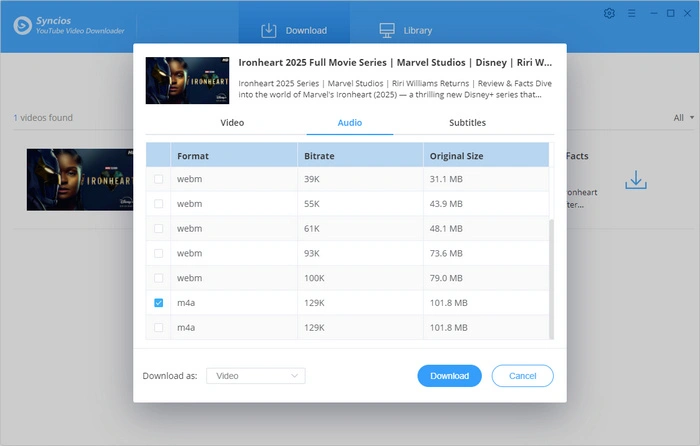
We strongly recommend Syncios FREE YouTube Video Downloader. It can not only download high-quality videos and playlists from YouTube, but also movies or anime from other platforms, as long as you have the streaming link. It's ad-free and features a simple layout, making it suitable for students to download videos for offline streaming anytime.
Syncios YouTube Video Downloader 
Multilingual subtitles and 4K video quality are available! Customize saving format as MP4/MKV/M4A/WEBM, you decide what to watch at school! >>> Use it for Free
Pro Tips to Download YouTube Videos:
- Download the YouTube videos in advance using WiFi at home.
- Save to a USB flash drive, cloud service, or your own device, then bring to school.
- Episodes are better and more convenient while at school.
Unblocked YouTube 10: Watch YouTube Alternatives
⭕Available on school-issued device.
To enjoy videos, sometimes you don't have to get unblocked YouTube videos. Various YouTube alternatives are offering similar features that you can access from school network.
- Khan Academy: Free courses covering math to science.
- TED-Ed: Short animated lessons on many topics.
- PBS LearningMedia: Educational videos.
- National Geographic Kids: Fun science videos.
- Crash Course: Fast-paced courses on many academic subjects.
- Vimeo: Creative and filmmaking videos.
- Dailymotion: Entertainment videos.
How to Watch YouTube Unblocked on A Restricted iPhone or iPad
⭕Available for school-issued or parent-supervised iOS.
Have you ever found that even if you bypass school network, you still can't have YouTube unblocked? That's the result of MDM or screen time restrictions. If you have one of the restrictions on school-issued or your own mobile device, most unblocked YouTube methods will be ineffective!
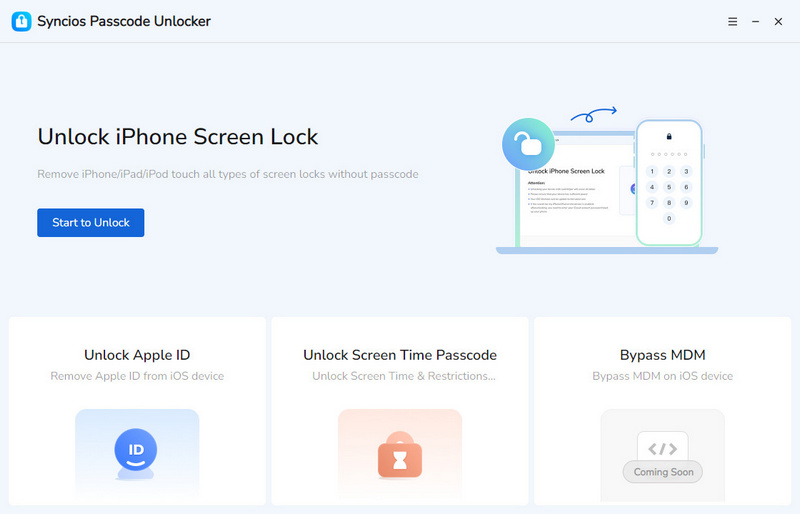
But we got this. Simply use Syncios Passcode Unlocker to remove restrictions without erasing data and control the iPhone or iPad as you like. Additionally, it allows you to bypass the screen passcode, Face ID, Touch ID, Apple ID and more. Say goodbye to a locked iOS device.
Syncios Passcode Unlocker
- Unlock 4/6-digit code/Face ID/Touch ID all screen lock without password.
- Unlock iPhone Apple ID with one click.
- Recover and reset Screen Time passcode without losing data.
- Remove Screen Time passcode without passcode.
- Support all iPhone models and iOS versions.
👉 Tutorial: How to remove MDM at school.
👇 Tutorial: How to bypass screen time restrictions.
- Step 1: Connect.
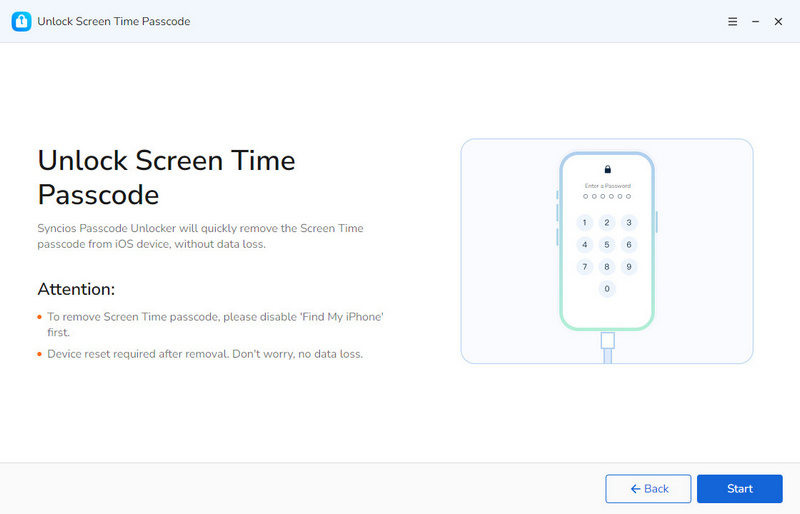
- Connect your restricted iPhone or iPad to your computer with a USB cable.
- Step 2: Select.
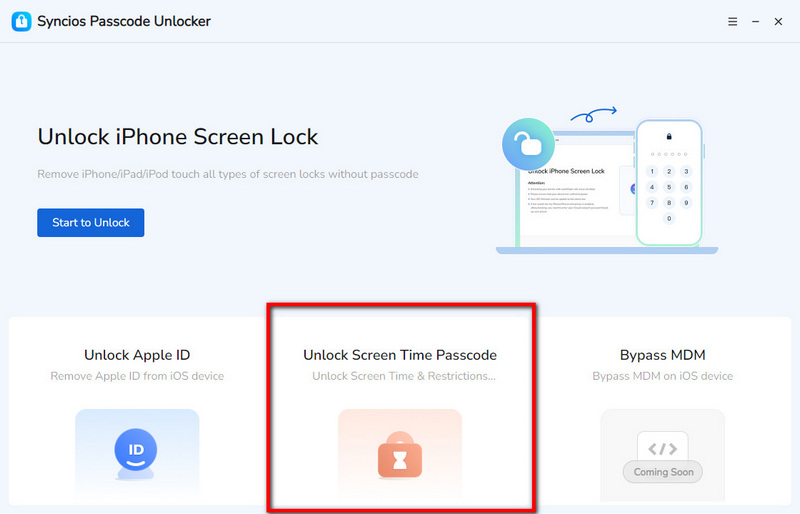
- Click to unlock the screen time passcode from Syncios Passcode Unlocker main interface.
- Step 3: Bypass.
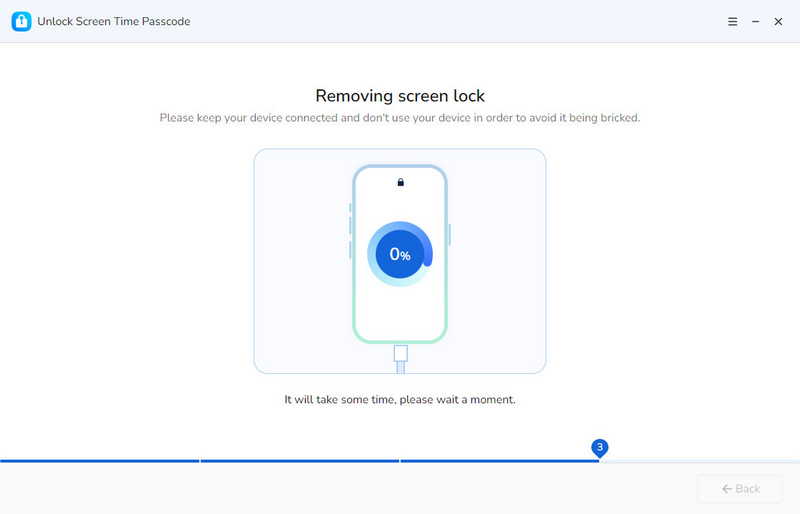
- Click to bypass screen time restrictions with all data intact.
- Wait patiently during the unlocking process.
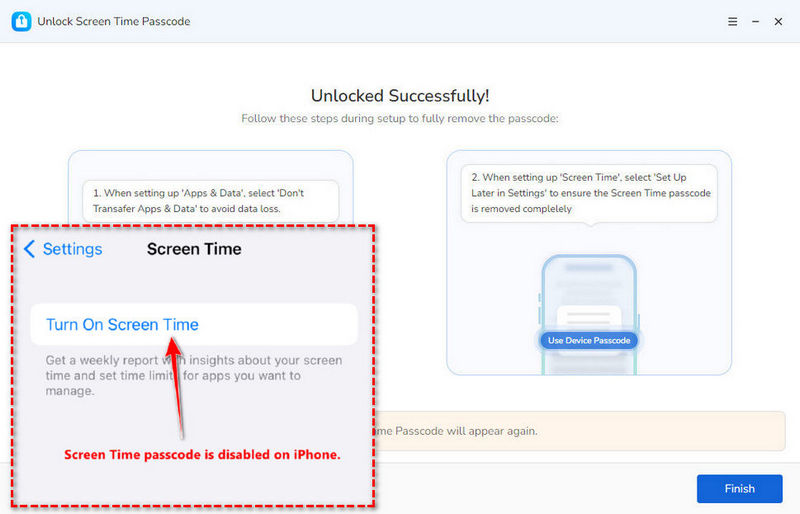
- Step 4: Get the unblocked YouTube videos after the removal.
FAQs About Unblocked YouTube
Unblocking YouTube is legal if you do not violate any rules or Terms of Service, and watch YouTube unblocked only for personal use.
Yes. If you mean the age restrictions, you can go to YouTube > "Settings" > "Restriction Mode" and toggle this off. If you mean other restrictions on your mobile device, you can resort to Syncios Passcode Unlocker to remove them.
Various methods can help you access unblocked YouTube videos at school. If you think highly of the safety, it is suggested to use VPN, Tor Browser, or just download YouTube videos for offline viewing. But if you don't want to take any steps to unblock YouTube, it is recommended to directly visit YouTube alternatives that are not blocked by school. For more flexible options, you can refer to this comparison table.
Final Words
Getting unblocked YouTube videos is super simple. These 10 proven methods help you bypass school network, and tools like Syncios Passcode Unlocker can provide support when restrictions prevent normal use of your iOS device. Select the method that suits your needs best and enjoy a more flexible YouTube viewing experience.
What's next? Download Syncios Passcode Unlocker now!

Ethan Mercer | Senior Writer
Related Articles
Related Solutions

Remove iPhone screen passcode, Apple ID, Face ID, and more in minutes.