>
How to >
>
How to >
How to Play Football Bros Unblocked at School
Football Bros is a chaotic, fast-paced online football game that drops you straight into the action with nothing but a keyboard and some quick reflexes. You pick plays, dodge defenders, and try to punch the ball into the end zone while real players from around the world try to tackle you into the turf. The matches are short, the physics are silly, and every round feels different because you never know who will show up in the lobby. It is exactly the kind of game you want to fire up during lunch break or between class periods.
However, most school WiFi networks block the official site and every obvious mirror they can find. You type in the URL, hit enter, and that familiar "Access Denied" page stares back at you. Don't worry. This guide tells you how to play Football Bros unblocked at school, working for school computers, Chromebooks and parental-controlled devices.

Part 1: Why Football Bros Is Blocked By School
Schools block Football Bros for various reasons. Gaming sites get flagged early by the school, and the network filters get updated frequently as well.
1. School networks prioritize academic use.
The school internet is usually for schoolwork first. Gaming sites fall into a category that most districts block by default, not because Football Bros itself is harmful, but because it lives on a domain tagged as entertainment. So it will be on the blocklist.
2. IT departments update blocklists based on student traffic.
When hundreds of students start visiting the same game site in the same week, the network logs light up like a holiday tree. Tech staff notice the spike, look up the domain, and add it to the filter. Football Bros spreads fast through word of mouth, which means its official site and popular mirrors get blocked faster than most other browser games. It is a cycle. You find a new mirror, the site gets popular, the school blocks it, and the hunt starts over.
3. Games cause distraction and bandwidth waste.
A single game of Football Bros does not use much data, but when an entire grade level is playing during class, it adds up. Administrators also receive complaints from teachers who notice students on games instead of paying attention, which catches Football Bros along with dozens of other titles.
4. Managed Chromebooks have extra restrictions.
If your school hands out Chromebooks, the device itself might have restrictions that block sites even when you are on your own WiFi. They can force safe search and maintain a school wide blocklist that travels with the device. This is why some methods work on a personal laptop but fail on a school issued Chromebook. The hardware is locked down before you even log in.
NOTE: Sometimes you bypass the network restriction, but you still can't visit the websites you like. That's Screen Time and Mobile Device Management (MDM). Simply remove them, and you can access the device without any restrictions.
Part 2: How to Play Football Bros Unblocked at School
Not every method works for every school network, so it helps to know more than one. Start with the easiest option and work your way down the list until something loads the game.
| Football Bros unblocked | Ease of Use | Requires Download | Device Compatibility | Best For |
|---|---|---|---|---|
| 1. Unblocked Game Sites | ⭐⭐⭐⭐⭐ | No | Chromebook, PC, Mobile | Quick and simple access |
| 2. Chrome Extensions | ⭐⭐⭐ | No | Chrome browser | Students who have access to Web Store |
| 3. Web Proxy | ⭐⭐⭐ | No | Browser-based devices | Web browsing situations |
| 4. Mobile Hotspot | ⭐⭐⭐⭐ | No | Chromebook, Laptop, Mobile | Devices restricted by school WiFi |
| 5. Offline File | ⭐⭐ | Yes | Depends on device | Offline gameplay |
Method 1. Unblocked Game Sites
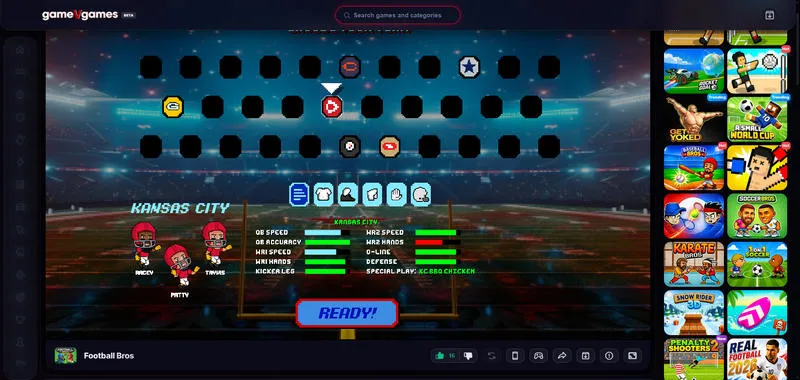
The fastest way to play Football Bros unblocked at school is to visit a game site that has not landed on your school's blocklist yet. They are copies of the original game hosted on alternate servers, so you get identical gameplay without touching the official domain. You can keep a list of three or four working sites saved in your bookmarks so you always have a backup when one goes down.
You can find Football Bros on general unblocked game hubs, GitHub IO pages, and smaller independent game portals that the filters have not caught up with yet. But the quality varies. Some sites are full of pop up ads, others run clean, and a few have older versions of the game with missing features. Stick to sites that do not ask you to download anything.
🔗 Unblocked Football Bros Game Sites:
- https://sites.google.com/site/unblockedwtf/football-bros
- https://www.gamevgames.com/game/football-bros
- https://igre.games/en/football-bros/play/
- https://www.twoplayergames.org/game/football-bros
- https://footballbrosio.io/online
- https://nargames.com/game/football-bros
- https://soccer-random.net/game/football-bros/
- https://mathplayzone.com/getaway-shootout/
- https://www.zgames.io/game/play-football-bros-online
- https://football-bros.me/
- https://soccer-bros.net/game/football-bros/
NOTE: The game should load directly in your browser with no extra steps. If a site asks for your email or wants you to install a launcher, close the tab and try a different one. The best unblocked versions of Football Bros require zero setup. You click the link, wait a few seconds for the assets to load, and you are picking plays before the bell rings.
Method 2. Chrome Extensions
If the above game sites are unfortunately on your school blocklists, try a Chrome extension. Since Football Bros is a browser-based game, you may look for extensions that work with Chrome. However, Chromebooks often have restrictions on installing extensions.
How to Use Chrome Extensions:
- Step 1: Open Google Chrome on your school computer and look for the three dots in the top right corner.
- Step 2: Click them to open the menu, then find the option labeled Extensions.
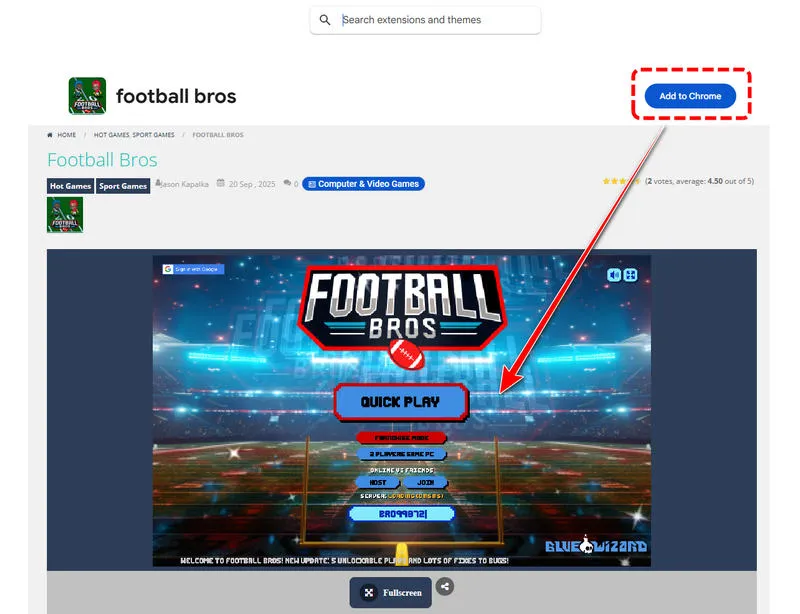
- Step 3: From there, select Visit Chrome Web Store to go on the official extension marketplace.
- Step 4: Type "Football Bros" in the search bar, then sort the results by Top Rated to see which ones other users trust.
- Step 5: Click the Add to Chrome button and confirm the installation.
- Step 6: When the extension finishes installing, its icon appears next to your address bar.
- Step 7: Click the Football Bros icon and it will redirect you to a new tab, where you can load and play this game.
(Some schools restrict the Chrome Web Store itself, so if the page will not load, you will need to try a different method instead.)
(If the first extension does not work or feels slow, remove it and try another one.)
Method 3. Web Proxy
When you cannot install anything on the school computer, web proxies are your next best option. They run entirely inside a web page, so you never download software or add extensions. You type in the URL you want to visit and proxy site fetches it for you. School filters only see you visiting the proxy domain, not the game site underneath. This approach works best when the Chrome Web Store is locked down and extension installs are disabled.
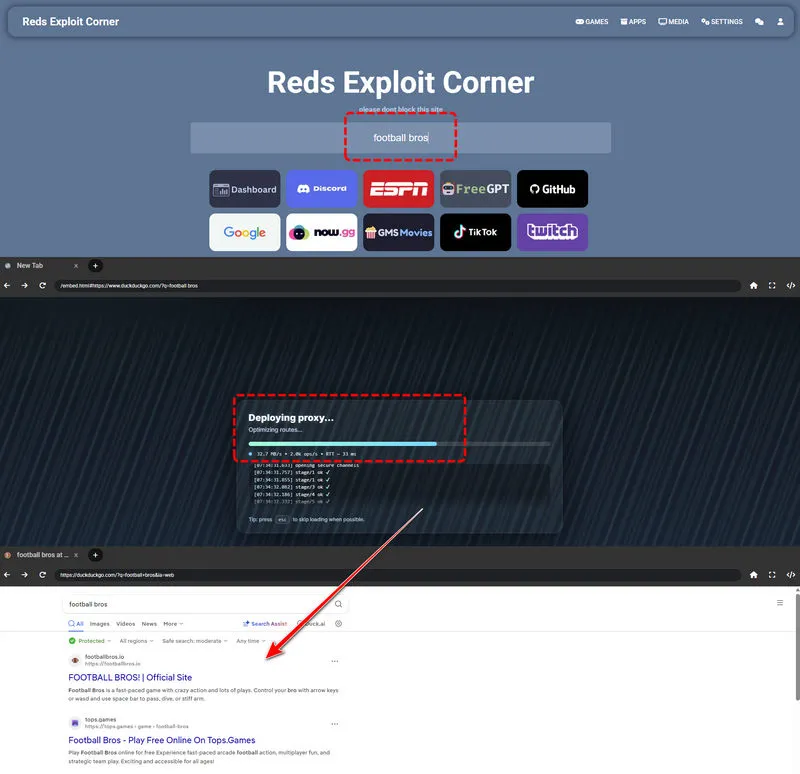
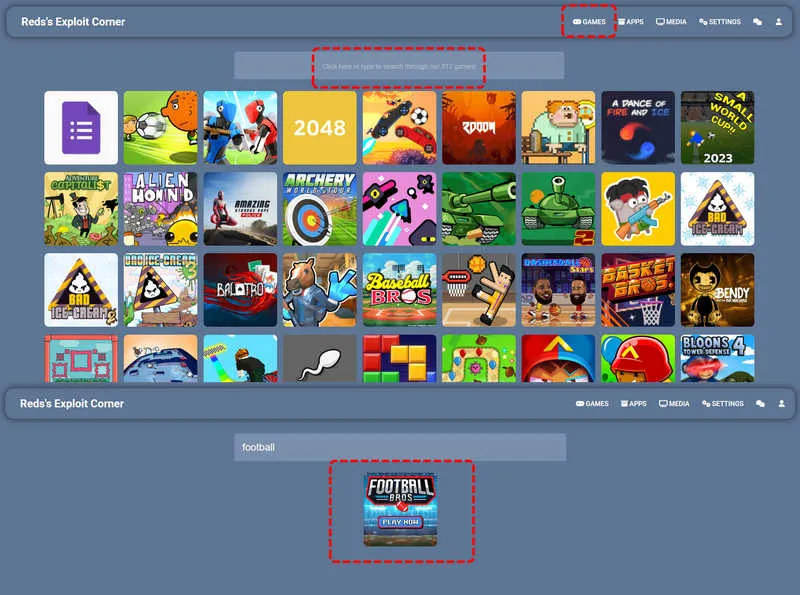
Here we find two working web proxy sites:
Both of the web proxies are free to use. You can see that their disguised domain makes them slip away from school filters. Although the interface is quite clean and user-friendly, some videos may pop up sometimes, redirecting you to an unknown page. Just close it whenever it redirects.
How to Use Web Proxy:
- Step 1: You have two different ways to play football Bros unblocked through the web proxy. Open one of them, and you can directly enter Football Bros or any other sites you want to visit in the search bar. And it will load the page for you through its built-in browser.
- Step 2: Alternatively, you can click the "Games" button in the upper-right corner, which already hosts 312 games to enjoy. You can play any games here or search for Football Bros.
- Step 3: Besides, you can directly visit various content, including games, apps, movies, shows and more in the main interface.
Method 4. Mobile Hotspot
If every browser based trick fails, using your phone as a mobile hotspot is the method that almost always works. You are not trying to bypass the school filter at all. You are simply leaving the school WiFi entirely and connecting through your own cellular data. The school cannot block what never touches their network.
This method costs data from your phone plan, and the speed depends on how strong your cell signal is inside the building, but for a quick game of Football Bros during lunch, it is usually more than fast enough. It is also the safest option if you are worried about school network logs, because none of your gaming traffic shows up on the school's servers.
How to Use Mobile Hotspot:
- Step 1: Open the Settings app on your phone and find the Personal Hotspot or Mobile Hotspot option. Turn it on and set a password if you have not already.
- Step 2: On your school device, open the WiFi menu and look for your phone's hotspot name in the list of available networks.
- Step 3: Select it, type in the password, and wait for the connection to establish.
- Step 4: Once you are connected to the hotspot, open your browser and go straight to the official Football Bros site. You are now browsing on your own data plan, so school filters do not apply.
- Step 5: The game should load exactly like it does at home. When you are done playing, disconnect from the hotspot on your computer and turn the hotspot feature off on your phone to save battery and data.
Make sure your cellular data is enabled and that you have enough data left for the month. A few rounds of Football Bros will not eat much data, but streaming or downloading on the hotspot adds up fast.
NOTE: Even if you use your own data, you still can't play Football Bros unblocked? It's the device restriction, instead of the network restriction. In this case, we recommend using Syncios Passcode Unlocker to remove parental control on your devices.
Method 5. Offline File
The offline file method is old but may be effective on school computers, especially when every online trick has been blocked. The idea is to save the entire game as a local file on a USB drive at home, then plug that drive into your school device and run the game directly from the folder. No internet connection is required during class, which means school filters cannot touch it.
How to Use Offline File:
- Step 1: Start on a computer that has full, unrestricted access to the internet.
- Step 2: Open the official Football Bros site in Chrome and wait for the game to fully load all of its assets.
- Step 3: Once everything is loaded, press
ControlandSat the same time to open the Save Page As dialog. - Step 4: Choose a location you can find easily, make sure the format is set to Complete Web Page, and save it. Chrome will create an HTML file and a matching folder full of images, scripts, and game data.
- Step 5: When you get to school, plug the USB drive into your school computer.
- Step 6: Open the files app and find the game folder on the drive.
- Step 7: Look for the main HTML file, usually named index or something similar. Right click the index file, choose Open With, and select Google Chrome from the list.
- Step 8: The game will launch locally in your browser, running entirely off the USB drive. Performance is usually great because there is no network latency, and you do not have to worry about the site getting blocked mid match.
NOTE: Keep in mind that offline versions cannot connect to online multiplayer lobbies. You will be able to play single player modes and local game types, but online matches against other players require a live internet connection.
Part 3: How to Play Football Bros Unblocked on School Chromebook
School-issued Chromebooks are harder to work with. Extensions can be blocked, app installs are disabled, USB is forbidden, and some network settings are locked behind administrator passwords. The five methods above still sometimes work, but their success rate drops significantly on heavily managed devices. If you are on a Chromebook and nothing is loading, try the method below instead.
1. Official Mirror Sites
When direct unblocked game sites are not available for your Chromebooks, you can use a few mirror sites that official Football Bros offers. This is usually easily ignored by students because these mirror sites should be known from official sites but they can't even access them. No worries. We can do this for you.
👉 xx Bros Unblocked official mirror sites collection (Baseball / Football / Basketball / Soccer / Wrestle / Kart / Karate Bros): https://sites.google.com/bluewizard.com/basket-bros-unblocked
🔗 Football Bros Unblocked Seperate Links:
- 1. lookinthe.net
- 2. baller.quest
- 3. dunkbros.com
- 4. baller.monster
- 5. durangobasketball.com
- 6. ballinthe.net
- 7. dunkbros.org
- 8. dunk.monster
- 9. berry.party
- 10. driplife.net
- 11. vtune.net
- 12. crispyclean.org
- 13. nbadebate.com
- 14. basketball.services
- 15. basketbros.net
- 16. avatarbasketball.com
- 17. fasterbasketball.com
- 18. basketballtips.info
- 19. basketballing.org
- 20. wizardsbasketball.com
2. Web Proxy
Another way to play Football Bros unblocked at school on Chromebooks is to use the working web proxy. As we mentioned earlier, they are disguised as educational domains (math), look like learning tools at first glance, but they include a built-in web proxy that can load game pages inside.
You can also check educational game sites like Cool Math Games and similar sites to see if they host Football Bros or a comparable football title. Schools rarely block full educational game platforms because teachers use them for class activities. If the portal has the game, you can play it without any extra tools. The selection changes over time, so it is worth checking back every few weeks to see what has been added.
Part 4: How to Play Football Bros Unblocked on A Restricted iPhone or iPad
Sometimes the reason you can't play games isn't the network, but the device, especially for parent-controlled or school-issued iOS devices.
These devices mostly have Screen Time or MDM. It can block specific domains, restrict Safari, and limit which apps you can open during school hours. If Football Bros will not load on your iPhone or iPad because of Screen Time controls, you are not stuck forever.
Syncios Passcode Unlocker allows you to remove Screen Time passcodes from iOS devices without wiping anything. Only a few clicks, your Screen Time restriction is gone and all of your data stays exactly where it was.
The tool works for more than just forgotten Screen Time passcode. It can also handle regular lock screen passcodes, Apple ID removal and more, all from the same interface. For students who just want to open Football Bros on their phone during lunch without parental controls getting in the way, the Screen Time removal module is the one you need. Use Syncios Passcode Unlocker, you can open Safari, navigate straight to the Football Bros site and play without restriction.
Syncios Passcode Unlocker
- Unlock 4/6-digit code/Face ID/Touch ID all screen lock without password.
- Unlock iPhone Apple ID with one click.
- Recover and reset Screen Time passcode without losing data.
- Remove Screen Time passcode without passcode.
- Support all iPhone models and iOS versions.

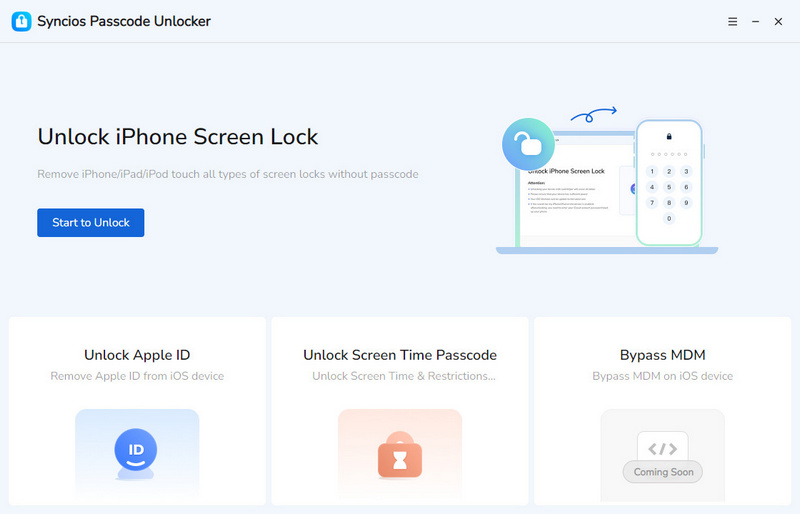
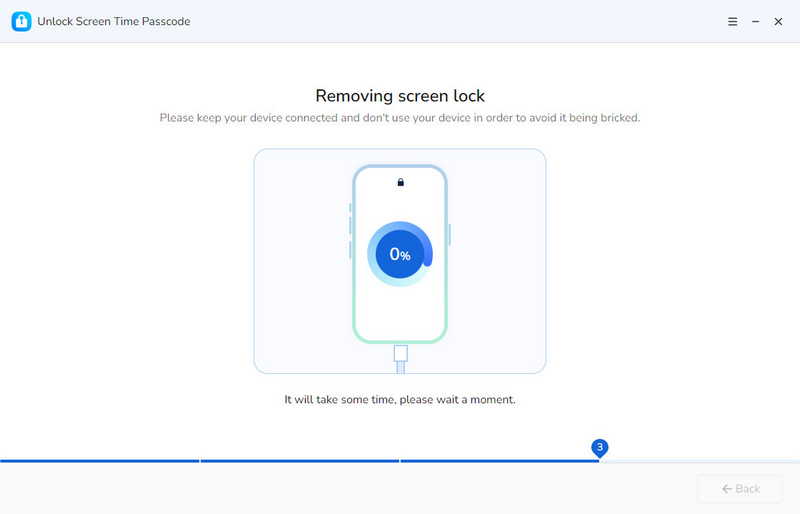
- Step 1: Connect. If you want to play Football Bros unblocked on your parental-controlled iPhone or iPad, download Syncios Passcode Unlocker. Launch it and connect your iOS devices to your computer using a USB cable.
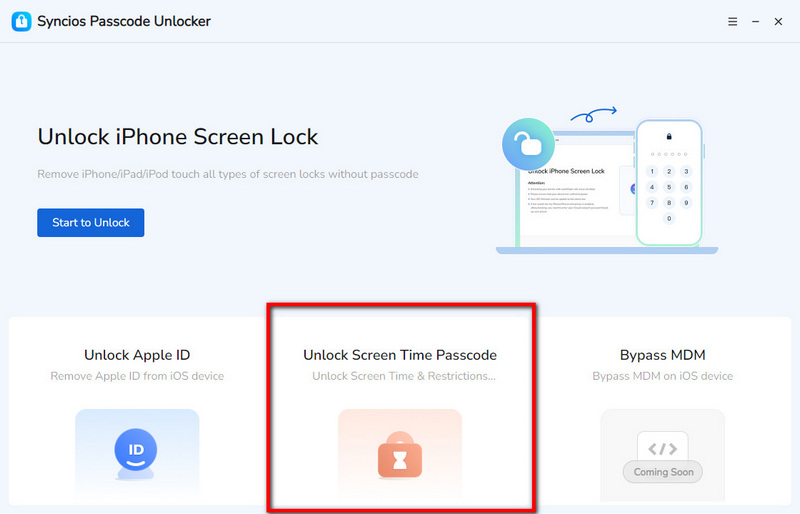
- Step 2: Select. Select the mode "Unlock Screen Time Passcode".
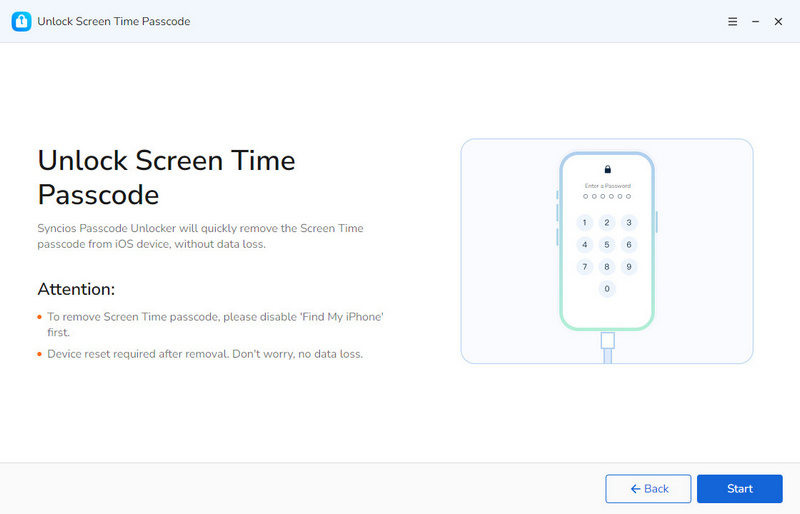
- Step 3: Bypass. Read the "Attention" that there will be no data loss here. When you are ready, simply click the "start" button.
- The unlocking process will not take too long. Wait patiently and ensure the connection is stable.
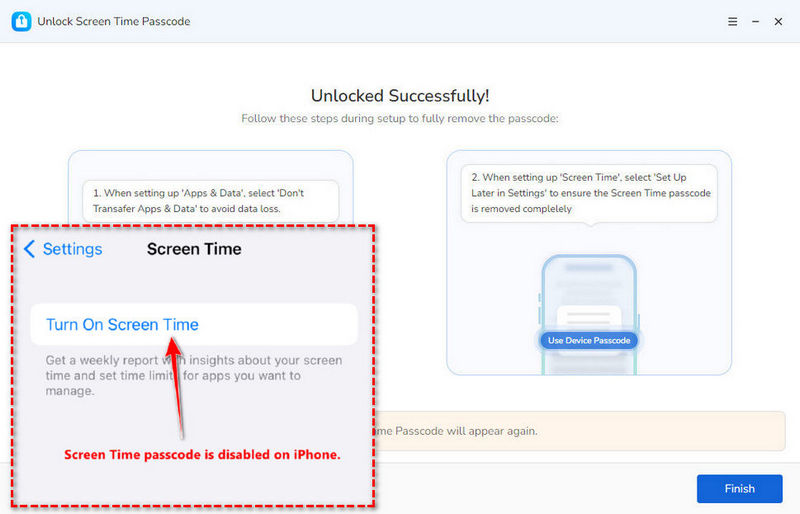
- Step 4: Finally, your screen time passcode will be removed successfully, with all data intact. Now you can use your iPhone or iPad as you like.
▶️ Video Tutorial:
Part 5: Football Bros Controls
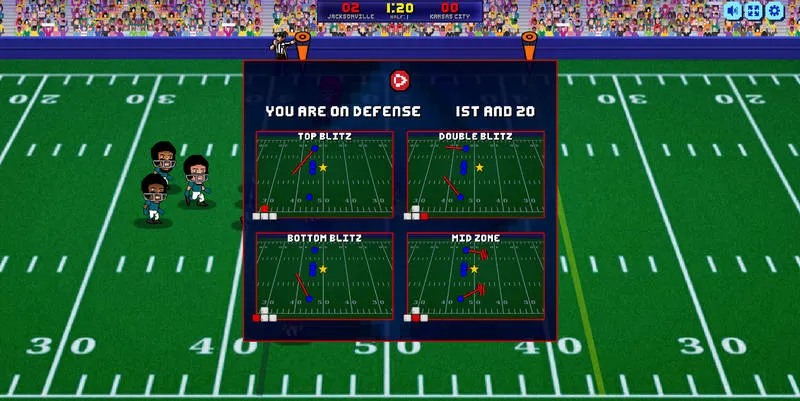
Football Bros uses a simple keyboard setup that is easy to learn but takes practice to master. Every action is within reach of your left hand, so you can keep your right hand on the mouse if you need it for menu navigation.
1. Arrow keys or WASD
Movement uses either the arrow keys or WASD, depending on what feels more natural to you. Both setups work the same way. Up and W move your player forward, down and S move back, and the left and right keys strafe side to side.
2. Space bar
The Space bar is your most important button. On offense, Space throws a pass to the nearest teammate or launches the ball downfield depending on the play you selected. On defense, the same Space button lets you dive tackle opponents and try to strip the ball. Timing your space bar presses is half the game. A well placed pass can turn into an easy touchdown, and a perfectly timed tackle can stop a drive cold.
3. Shift
Shift is your sprint or dash button. Hold it while moving to run faster, which is essential for breaking away on offense or chasing down a ball carrier on defense. Sprinting drains stamina quickly, so you cannot hold it forever. Save it for the moments that matter, like when you have an open lane to the end zone or when you need to catch up to a player who is about to score.
4. Additional action keys
In most versions, X is for stiff arms or spin moves on offense, and Z is for dodging or juking past defenders. Some versions also use C for diving tackles or sliding catches. The in-game menu usually shows the full control layout, so take ten seconds to look it over before jumping into a match. Nothing is worse than fumbling a pass because you pressed the wrong key.
Part 6: Similar Games Like Football Bros
Football Bros is great, but sometimes you want a change of pace or the mirrors are all down and you need something else to play.
1. Basket Bros
Basket Bros swaps the gridiron for a basketball court and keeps all the wild physics and silly character designs. You dunk, steal and shoot three pointers against other players in fast two minute matches. The controls feel almost identical to Football Bros, so if you know one you can pick up the other in about thirty seconds.
2. Soccer Bros
Also built in the same Bros style, Soccer Bros is a 1v1 or small team soccer game with over the top goals and bouncy physics. When you shoot your way to victory, trying not to get slide tackled into the wall.
3. Baseball Bros
If you enjoy timing based sports action, Baseball Bros is worth a look. It lets you bat, pitch and run bases in quick online matches against other players.
4. Rocket Soccer Derby
For something a little different, Rocket Soccer Derby puts you in a car and lets you play soccer with boosts and flips, like a browser version of the popular vehicular soccer games. The matches are chaotic, the physics are wild, and scoring a goal from across the field never gets old. It runs in the browser with no download, so it fits the same school gaming.
5. Football Legends 2026
This is a bigger, more polished browser football game with character upgrades, special moves, and multiple game modes. It is a little slower paced than Football Bros, but it has more depth and a longer progression system.
FAQs About Football Bros Unblocked
The most reliable method on a school Chromebook is to start with unblocked game sites and official mirrors that have not been flagged yet. Or, you can use these two web proxies to visit Football Bros.
No, playing unblocked games is not illegal in a legal sense. There are no laws against visiting a game website or using a proxy to reach one. The issue is that it almost always violates your school's acceptable use policy. Consequences are usually detention, lost device privileges, or restricted internet access, not fines or police involvement. That said, you should know your school's rules and understand the risks before you start bypassing filters. Every school handles it differently.
The biggest risk is getting caught and facing school discipline. Beyond that, some unblocked game sites are loaded with sketchy ads, pop ups, and fake download buttons that can lead to malware or unwanted browser extensions. Stick to well known sites with HTTPS and never download files from a game page unless you are sure what it is. Free proxy sites can also see what you browse through them, so avoid logging into personal accounts while using one. And of course, playing during class instead of paying attention can hurt your grades over time.
It depends on what you are trying to unlock.
For websites and browser games, a reliable web proxy usually does the job. For iOS devices locked down with Screen Time, Syncios Passcode Unlocker stands out because it removes the Screen Time passcode without deleting your data. For Chromebooks, a mobile hotspot may be the most helpful because you are no longer on the school network at all.
Cool Math Games is the classic example. It is branded as an educational math and puzzle site, so most schools leave it unblocked for classroom use. You can find it at coolmathgames.com. It has hundreds of puzzle, strategy, and arcade games, including some sports titles that scratch the same itch as Football Bros.
Google Mini Games are another safe bet. Built in games like Google Solitaire, Google Snake, and the various Doodle games run directly on Google's own domains, which schools almost never block because Google is core to classroom work. You can access them just by searching their names in Google.
Final Words
There is something special about squeezing a quick football match into a twenty-minute lunch break.
This guide exists to save you the trial and error of clicking dead link after dead link. Whether you are on a regular laptop, a managed Chromebook, or a phone with Screen Time restricting you, there is a method here that will get you on the field. For iPhone and iPad users who keep hitting that Screen Time wall, Syncios Passcode Unlocker takes the restriction off with all data intact. Just play Football Bros unblocked anywhere and anytime.
What's next? Download Syncios Passcode Unlocker now!

Ethan Mercer | Senior Writer
Related Articles
Related Solutions

Remove iPhone screen passcode, Apple ID, Face ID, and more in minutes.