>
How to >
>
How to >
What Actually Works to Get Spotify Unblocked for School
The leading audio streaming service Spotify would be one of your best options to enjoy music. When you want to listen to music and have a rest at school, only to find that you can't access it on school device or showing "The app is restricted". Under these circumstances, you search "Spotify Unblocked" and various guides come to you and encourage changing DNS or using VPN. But these methods are not always working.
Spotify is blocked usually for two different reasons, network blocks and device restrictions. Understanding the difference is the key to unblock Spotify. This guide will walk you through why Spotify is blocked and effective methods that actual works to get Spotify unblocked according to different reasons separately. Let's see what occasion you belong to.
Part 1: Why Is Spotify Blocked?
There are mainly two reasons why Spotify is blocked at school or somewhere else. One is network restriction, the other is device restriction. Most people understand network blocks while easily ignoring the device factor. Things always happen when you successfully bypass school network, you still can't play Spotify playlists. So it's important to learn your actual situation and find a solution that suits you the best.
Spotify Blocked By School Network
To save bandwidth and focus on educational resources, it's common for schools to use the WiFi system to block access to distractions, including Spotify, Roblox, YouTube, etc. Both central firewalls and content filters play a role in blocking the Spotify domain and streaming servers. Firewalls block specific IP addresses and streaming ports, and content filters determine whether content is playable based on its content label. In fact, the school network cannot be bypassed as easily as you might think.
- When connected with school WiFi, you open the Spotify app or visit spotify.com at school.
- The request comes to firewall first.
- Firewall recognizes that the IP address you request to visit is Spotify, and disallows access.
- Even if firewall allows this access request, content filter is your second obstacle.
- Content filter will categorize Spotify as entertainment content, and then forbid playing.
- As a result, Spotify is blocked by school network.
Spotify Blocked By Screen Time Or Device Management
Besides network restriction, school also uses device restriction to keep students focused on studying. Usually, school computers and school-issued iPhone or iPad are managed by MDM (Mobile Device Management) or screen time restrictions. In this case, Spotify may be hidden by school administrator, you can't install or open it, you can't play any music, and it shows you "The app is restricted". So when the restriction is directly applied to your device, even if you get rid of school and change the network environment, Spotify is still blocked.
NOTE: Device restriction is the reason why you can't use Spotify? Quickly remove restrictions and get Spotify unblocked from anywhere.
| Reasons of Being Blocked | Signs of Spotify Being Blocked | Effective Methods |
|---|---|---|
| Network Restriction | ||
| Device Restriction |
Part 2: How to Get Spotify Unblocked from Network Restrictions
Since we have learned about the principles of school network restriction, the key to get Spotify unblocked is to bypass school network. In this part, we recommend using a VPN, web proxy, and mobile hotspot. Some students ask what if using Spotify Web Player or changing DNS? Actually, they are not very effective, you can check why these methods can't unblock Spotify.
Method 1: VPN
To play Spotify unblocked at school, A VPN (Virtual Private Network) is the most reliable way to bypass school WiFi system because it encrypts your internet traffic and routes it through a third-party server in a different location. In this way, you can use VPN to trick the school network into thinking you are accessing the content from somewhere unrestricted.
How to Get Spotify Unblocked:
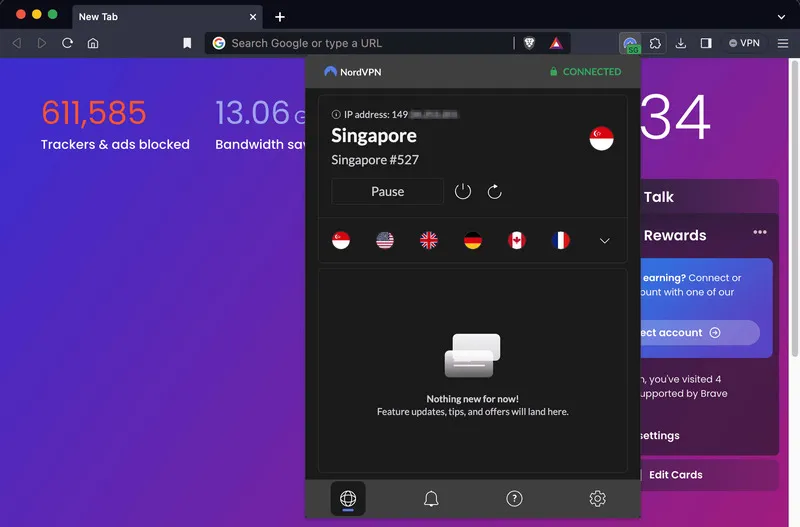
- Step 1: Choose a reliable VPN, such as NordVPN, ExpressVPN, or Surfshark, which is compatible with Windows, macOS, Android and iOS. Free VPN is not recommended because they may be very slow and not safe.
- Step 2: Download and install the VPN app on school devices, computers, iPhone or iPad.
- Step 3: Open the VPN app on the device and sign in with your account.
- Step 4: Select a server location and then connected to it.
- Step 5: Then open the Spotify app or visit its Web Player. Now you should be able to stream music without restrictions.
- Step 6: If it still doesn’t work, you can try a different server.
NOTE: If the problem persists, you need to remove device restriction instead of network. One more situation, although VPN helps to bypass school network entirely, you may not be allowed to download it on school computer, iPhone, or iPad, this is also the result of device restriction, and you don't have permission.
- Bypass school network effectively.
- Encrypts your data so it is safe to use.
- Works for other blocked sites or apps like YouTube.
- Some schools block VPN apps themselves, so it's challenging for you to download it on school device.
- Reliable VPNs require a paid subscription.
- Certain servers are not stable and slow down your speed sometimes.
Method 2: Proxy
Similar to VPN, a proxy server acts as a middleman between your device and the internet to help you get Spotify unblocked for school without much hassle. It hides your IP address, letting you access blocked sites by routing your traffic through an unrestricted server. Compared to VPN, Proxies are easier to set up without downloading. However, it is also less secure because no data will be encrypted.
How to Use Web Proxy for Spotify Web Player:
- Step 1: Find a reliable proxy server website. For some good free options, you can check here.
- Step 2: You can simply visit the proxy site on school computer or mobile device, then enter
https://open.spotify.com/to the URL bar. Click "Go". - Step 3: It fetches the Spotify website for you so you can enjoy the music now.
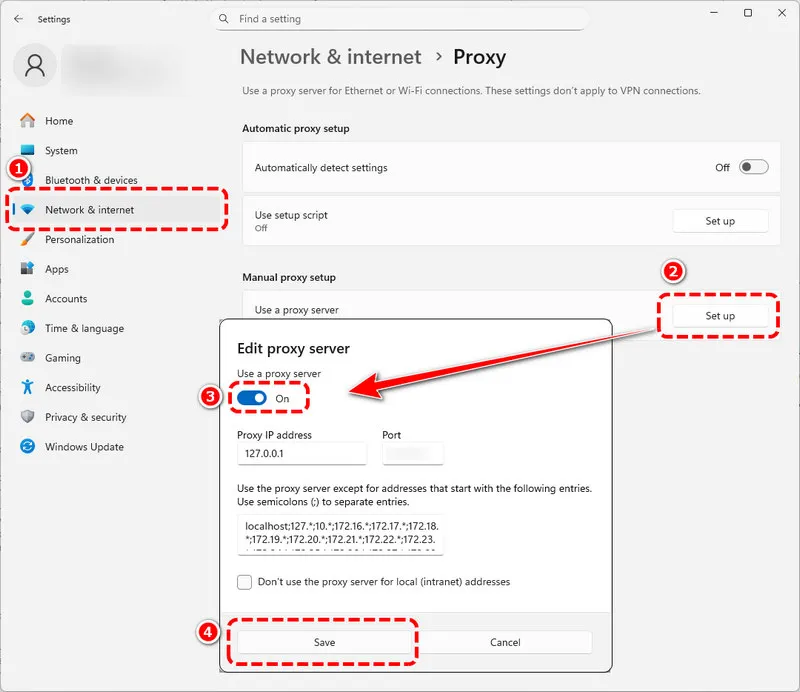
How to Use Proxy on Computer:
- Step 1: If you want to use the proxy server for computer system, find a trustworthy one.
- Step 2: On school computer, go to Settings > Network&Internet > Proxy.
- Step 3: Locate Manual proxy setup, toggle it on.
- Step 4: Enter the proxy server address and port, then save. Now you can stream Spotify app normally.
How to Use Proxy Within Spotify App:
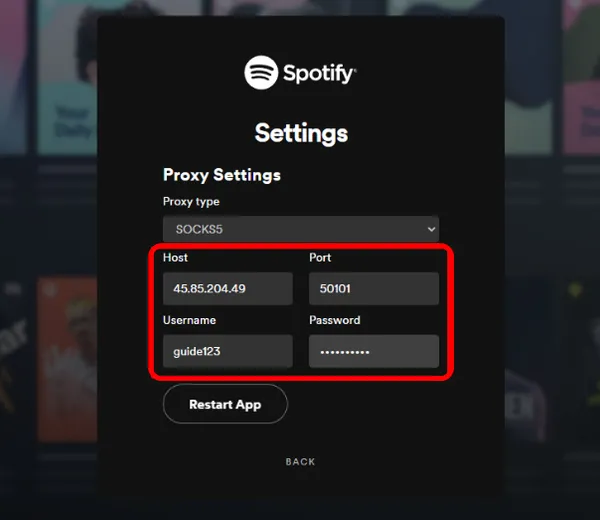
- Step 1: Besides setting the proxy in computer settings, you can also use the proxy inside the Spotify app.
- Step 2: Open the Spotify app on school computer, tablet, mobile phone, or whatever device it is installed on.
- Step 3: Go to Settings > Proxy Settings.
- Step 4: Enter host and port, then tap Restart App. When it open agian, you will get Spotify unblocked successfully.
- Quick and easy to set up.
- No need to download apps.
- Most are free options.
- Less secure because it can't encrypt your data.
- Free proxies are often very slow and overcrowded.
- Some proxy websites may be still blocked by school network.
Method 3: Mobile Hotspot
It is the school network that blocks you from streaming, what if you don't use it at all? Since both VPN and proxy themselves have the risk of being blocked, skipping a network and using your phone’s mobile hotspot or mobile data is the 100% working method to get Spotify unblocked for school or anywhere. This method uses your cellular data so it bypasses school WiFi system entirely, which is simple and requires no extra tools.
How to Get Spotify Unblocked:
- Step 1: On your own phone, go to Settings > Personal Hotspot.
- Step 2: Toggle on the hotspot, next set a WiFi name and password.
- Step 3: On school computer or issued iPhone/iPad, go to WiFi settings, and then connect to your phone’s hotspot using the password.
- Step 4: Once connected successfully, you can open Spotify and stream without any school restrictions.
- Step 5: If it is convenient for you, you don't have to enable the mobile hotspot. You can directly stream Spotify on your phone.
NOTE: Pay attention to the data assumption on your phone. If you can't make changes on WiFi settings, screen time or MDM restricts you. Move to the next part to learn how to remove it effortlessly.
- It's 100% working and bypass school network entirely.
- There is no download or subscription needed.
- It could consume a large amount of your cellular data.
- Not friendly if your school has a policy forbidding phones.
- This method relies on places with a signal.
Part 3: How to Get Spotify Unblocked from Device Restrictions
If you are confused why you still can't stream Spotify at school as you have already bypass school network, you forgot the other important factor, device restriction. Sometimes the problem isn’t only the network, because school often use MDM (Mobile Device Management) or Screen Time to block apps like Spotify on school-issued devices.
Method 1: Bypass MDM
You should note that almost all school devices, including Chromebook, iPhone, iPad, Windows, and Macs, are controlled by MDM or similar software. It will block apps, restrict settings, and monitor usage. If you want to bypass MDM to get Spotify unblocked, you need a tool designed to remove these restrictions.
How to Get Spotify Unblocked:
- Step 1: Download and install an MDM bypassing tool on your computer.
- Step 2: Connect your restricted device to the computer using a USB cable. Tap "Trust This Computer".
- Step 3: Click the option to remove the MDM profile.
- Step 4: Once done, your device will be restarted and then you will have an unrestricted device.
NOTE: Bypassing MDM may violate your school’s policy, and your phone data will be cleared after the process. So it is not recommended to do this. When you encounter the MDM, the safest way is to contact school administration.
- Permanently removes MDM restrictions.
- Works for school-issued Chromebook, iPhone, iPad, etc.
- May violate your school’s device policy.
- High risk, may cause data loss.
Method 2: Remove Screen Time
You may encounter Screen Time restrictions on school-issued or parental-controlled devices. It prevents you from downloading or using apps like Spotify. If you know the passcode, you can remove it effortlessly from Settings. But in most cases, you don't have the permission to turn it off, which is the reason you need an unlocker tool.
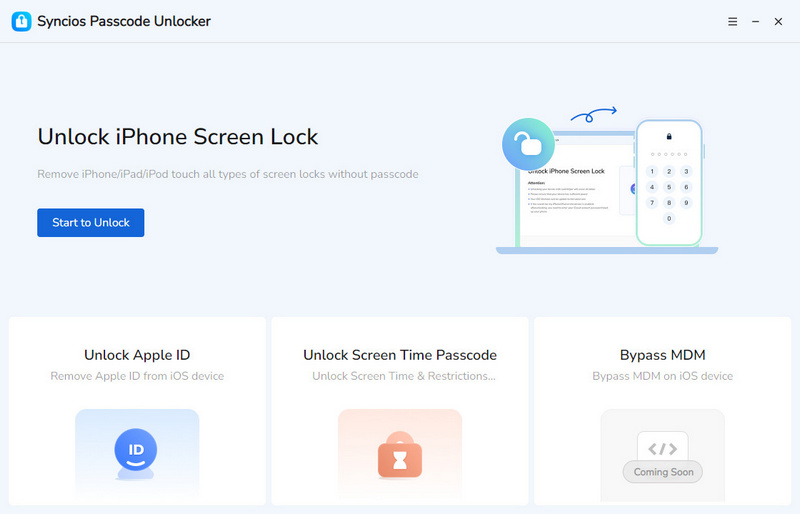
Syncios Passcode Unlocker allows you to remove Screen Time from school-issued iPhone or iPad easily. Most importantly, this reliable tool will keep all your data intact after you remove the restriction. Compared to MDM, removing Screen Time is relatively less strict and risky. So if you happen to have a restricted iOS device handy, why not give it a try? When restrictions are gone, you can not get Spotify unblocked, but also almost all apps.
Syncios Passcode Unlocker
- Unlock 4/6-digit code/Face ID/Touch ID all screen lock without password.
- Unlock iPhone Apple ID with one click.
- Recover and reset Screen Time passcode without losing data.
- Remove Screen Time passcode without passcode.
- Support all iPhone models and iOS versions.
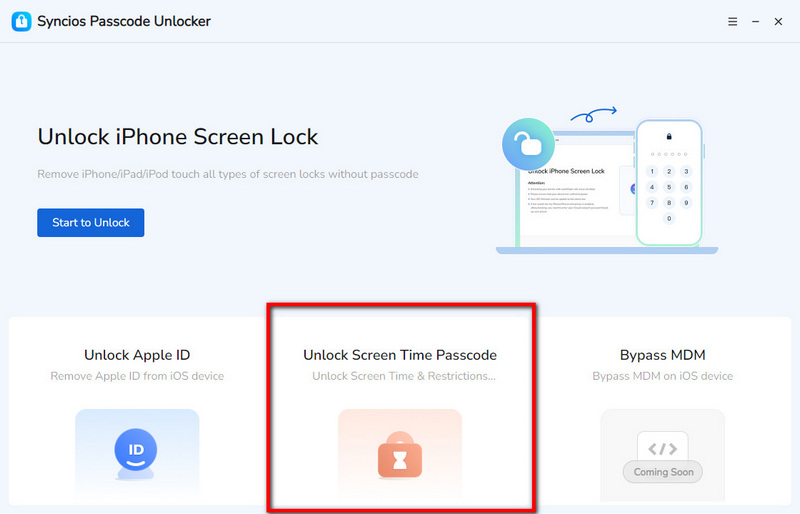
- Step 1: Connect.
- Launch Syncios Passcode Unlocker on your Windows PC or Mac. Next, connect iOS device to the computer via a USB cable.
- Step 2: Select.
- It provides three unlocking modes. Select "Unlock Screen Time Passcode" mode.
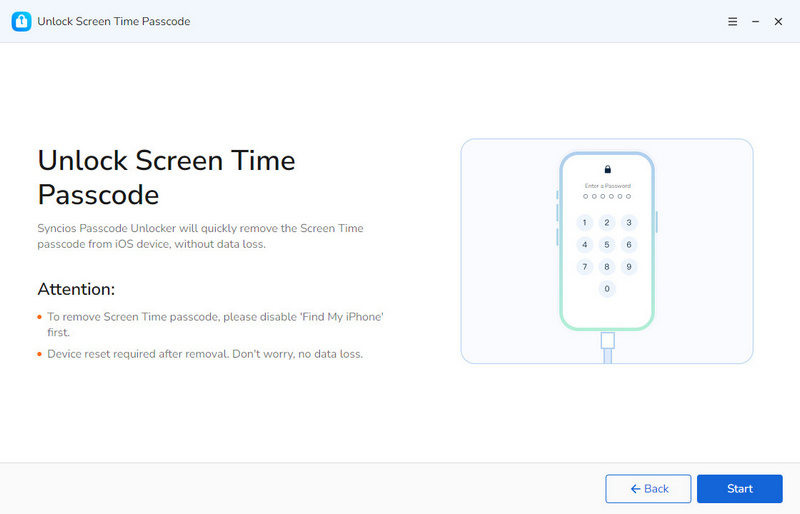
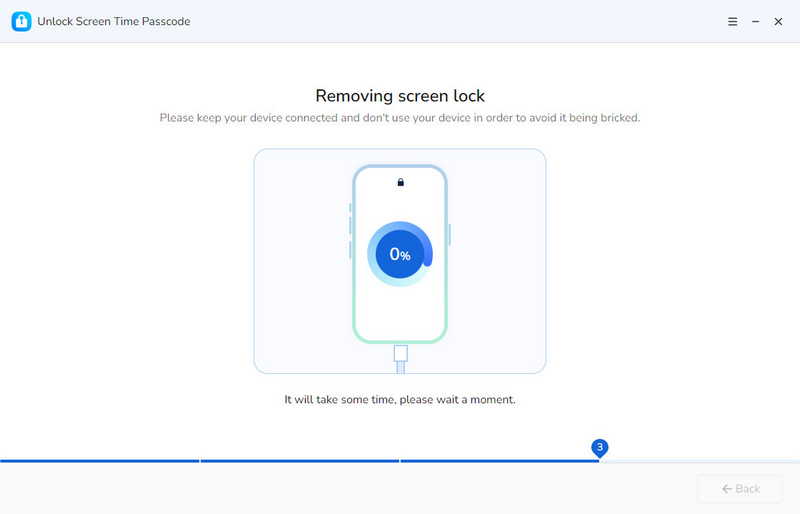
- Step 3: Bypass.
- Click the "Start" button when you are ready.
- The removing process will not take too long, so please keep the connection stable and wait patiently.
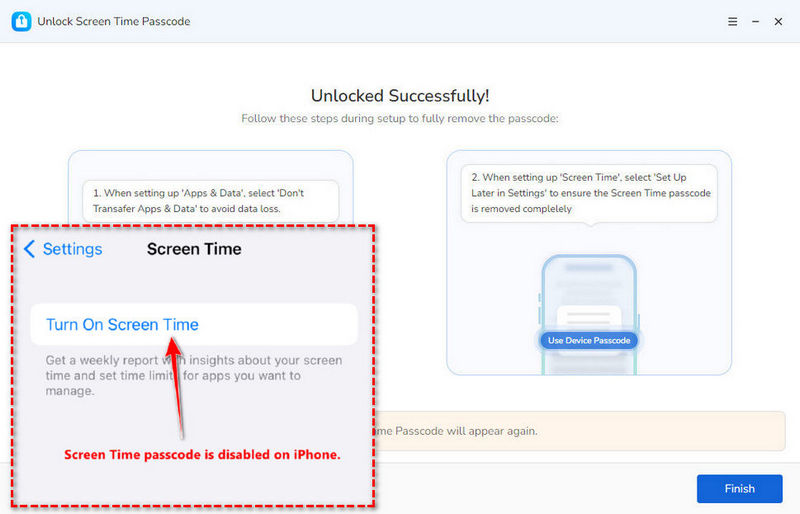
- Step 4: The Screen Time restriction has been removed successfully. Your phone will restart and no data will be lost.
- Simple operation friendly to beginners.
- It will not erase your device data.
- Safe to use.
- It requires a computer.
▶️ Video Tutorial:
Part 4: What Does Not Work to Unblock Spotify
While many guides suggest using DNS, Web Player, unblocked music sites, etc, this part will explain why these methods rarely work to get Spotify unblocked. Before you waste time trying in vain, let's clear up the myths.
1. DNS
Changing DNS or Smart DNS is a highly used trick when it comes to unblocking. However, DNS (Domain Name System) can only translate the website name to its corresponding IP address. Changing the DNS or Smart DNS settings will not change the domain or the IP address itself. So when you visit Spotify, school firewall will still detect that the IP address you request to visit is Spotify, and then block it.
- You request to visit Spotify > DNS translates Spotify as an IP address > IP address is sent to network > firewall blocks it.
2. Spotify Web Player
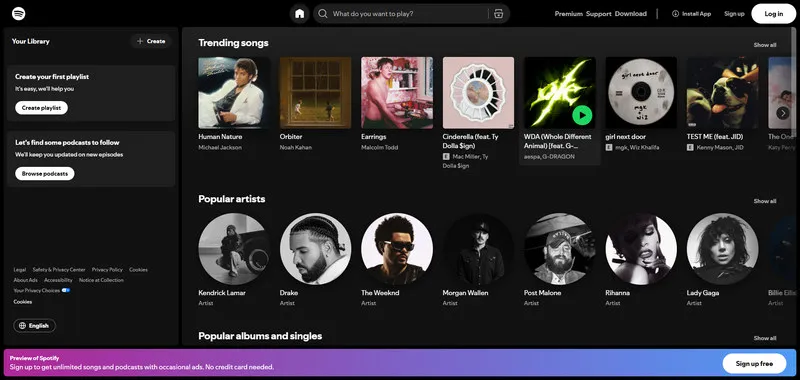
Some students may consider using Spotify Web Player if school blocks the Spotify app. But you are wrong. As we mentioned in Part 1, school WiFi system uses firewall and content filters to detect the IP address and blocks unauthorized access, whether for apps or websites. As long as you are using school network, Web Player is not a wise option to get Potify unblocked.
3. Unblocked Music Sites
An unblocked music site is also not effective for unblocking Spotify and is not recommended. Most sites like "Spotify unblocked" or "free unblocked music" may be your alternative to stream Spotify, but they are not official Spotify having limited features. Furthermore, intrusive ads, pop-ups, hidden redirects, or malware pose potential risks. Most importantly, these sites may work for a while for school, but they will be blocked by firewall eventually, so it's not a long-term solution.
FAQs About Spotify Unblocked
To use Spotify on a school computer, you can try VPN, proxy, and mobile hotspot. But in most cases, VPN and proxy themselves will be blocked by content fileter or MDM restrictions in school environment, making it difficult to access. So it is recommended to directly use personal hotspot to bypass school network and then use Spotify on computer.
If the restriction is on your own mobile device, you can go to Settings> Screen Time > Turn Off. For those who don't have the password or using a school-issued iPhone, Syncios Passcode Unlocker is your best choice to remove Spotify restrictions without data loss.
In fact, when you don't use VPN or similar tool, the only unblocking method is to use mobile data, which is the most reliable and safest. If you find that Spotify is still blocked after bypassing the network, it's the result of Screen Time. You can use Syncios Passcode Unlocker to remove these restrictions.
Final Words
Spotify is more than just music. Both network and device restrictions affect getting Spotify unblocked. You should stick to methods that actually work instead of using old tricks. A mobile hotspot is always your best choice to bypass the school network completely. However, MDM or Screen Time can be your second obstacle. In this case, a hassle-free solution is necessary. Syncios Passcode Unlocker removes restrictions from your iPhone and iPad without losing data and lets you stream your favorite playlists whenever you want.
What's next? Download Syncios Passcode Unlocker now!

Ethan Mercer | Senior Writer
Related Articles
Related Solutions

Remove iPhone screen passcode, Apple ID, Face ID, and more in minutes.