>
How to >
>
How to >
5 Online Methods to Play Getaway Shootout Unblocked at School
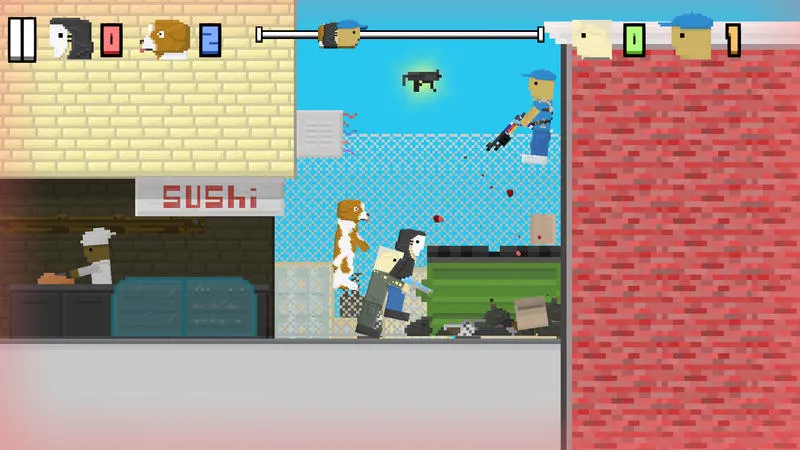
The reason you choose Getaway Shootout must be for fun! Unlike normal racing games, characters on Getaway Shootout cannot walk, jumping left or right instead, making the whole multiplayer gameplay hilarious.
When you have some free time at school, you would like to have a chaotic racing shooter with your friends. But usually, school network blocks Getaway Shootout, leaving you frustrated. If you also want to know how to play Getaway Shootout unblocked at school, check out this guide. It will walk you through 5 online methods to enjoy the game whenever you want, pro tips to improve your skills and alternatives for quick playing.
Part 1: Why Is Getaway Shootout Blocked at School?
You may think you are the responsible students who only play Getaway Shootout after sessions, while a majority of students may play games during classes if no games are unblocked, as a result, no tasks are completed and no knowledge is absorbed. Check the reasons why school blocks various games and remember assignments first then games during breaks.
Prevent Distraction:
The priority for students at school is to learning. If some students only concentrate on playing games during class, it will affect study efficiency and classroom discipline. So, to make students focus on academic tasks, school IT admin will use WiFi system and content filters to block sites labelled as entertainment or game.
Save Bandwidth:
School network is used for educational resources and platforms. If students open gaming sites at the same time, it will consume bandwidth and slow down real important services. Blocking games is not only to save bandwidth, but also to keep the network fast and stable all the time.
Avoid Potential Risks:
Most unblocked gaming sites are not secure enough, and may contain hidden links, aggressive ads, and malicious content. To protect students from these potential risks and privacy tracking, it is a wise choice for schools to block game sites and pay more attention to students psychological health.
Part 2: 5 Online Methods to Play Getaway Shootout Unblocked at School
How to play Getaway Shootout unblocked at school? Where can I play and can I play on Chromebook? This part introduces 5 online tricks to bypass school network and enjoy gameplay during your lunch or study hall break. Not all methods work for Chromebooks, but web-based ways are convenient anyway.
| Getaway Shootout unblocked | Unblocked Effectiveness | Available on Chromebook | Ease of Use | Best For |
|---|---|---|---|---|
| 1. Unblocked Game Sites | ⭐⭐⭐⭐ | Yes | Very Easy | Most commonly used method to play during short breaks |
| 2. Mobile Hotspot | ⭐⭐⭐⭐⭐ | Yes | Easy | You are allowed to bring phone to school |
| 3. Web Proxy | ⭐⭐⭐ | Sometimes yes | Medium | Workaround worthy of trying when some proxy sites are still available |
| 4. Chrome Extension | ⭐⭐⭐ | No. Try other school computers | Medium | Suitable for weaker school blocks that allow extensions |
| 5. Online VPN | ⭐⭐ | No. Try other school computers | Difficult | Suitable for weaker school blocks that allow extensions |
Method 1. Unblocked Game Sites
When it comes to playing games at school, this is your go-to and favorite choice because it's straightforward and zero setup. You can simply open a browser on school Chromebook and computer, type the site, and start playing. Lots of sites are escaped from school network because they are niche, so you can easily play Getaway Shootout unblocked as you want. But some sites may be blocked eventually, which is how new unblocked sites become necessary. There are a few sites that still work, bookmark them before you lose access.
🔗 Unblocked Getaway Shootout Game Sites:
- https://getawayshootout.pages.dev/
- https://getawayshootout-game.github.io/
- https://poki.com/en/g/getaway-shootout
- https://www.crazygames.com/game/getaway-shootout
- https://watchdocumentaries.com/getaway-shootout-game/
- https://www.twoplayergames.org/game/getaway-shootout
- https://play.unity.com/en/games/f5c4d162-bae9-48ee-8238-1b7f039503ed/getaway-shootout
- https://sites.google.com/site/unblockedgamestop/getaway-shootout
- https://mathplayzone.com/getaway-shootout/
- https://bloxorz.org/getaway-shootout
- https://sites.google.com/site/unblockedwtf/getaway-shootout
NOTE: You can visit certain unblocked sites effortlessly because they are not mainstream, but pop-up ads, redirects and unknown links are obvious. And game quality varies from site to site. So remember not to click on any malicious content and select a suitable site.
- No downloads, no extensions, just open and play.
- Works on almost all school devices including Chromebooks.
- Suitable for quick playing whenever you want.
- Sites can get blocked eventually if school update filters.
- Some sites have annoying pop-up ads which may interrupt you.
- Occasional lag if too many students are on the same site.
Method 2. Mobile Hotspot
When you at school, you use their network and their device, so they can control what you can visit. If you use mobile hotspot, you get rid of school network entirely and you can play leisure games, listen to playlist, watch an episode at school anytime. Moreover, since you have data on your phone for hotspot, you can also access sites you want directly from your device.
NOTE: When you don't use school WiFi, still blocked on school Chromebooks or computers? MDM controls. Please resort to school IT admin. If it is iPhone or iPad that is controlled, resort to Passcode Unlocker to remove restrictions discreetly.
How to Use Mobile Hotspot:
- Step 1: Turn on mobile hotspot from Settings on your own phone.
- Step 2: Set a password so no one else connects.
- Step 3: On school computers or laptops, go to WiFi settings, enter your password, and then connect it.
- Step 4: When the connection is established, you can open any browser and go to the game site you want with no blocks.
- 100% unblockable, no filters to worry about.
- Works for all devices, including Chromebooks and iPads.
- Game runs smoothly because phone data is usually faster than school WiFi.
- Consume your own phone data.
- Drains your phone battery quickly.
- You need to have your phone with you while school policy may forbid this.
Method 3. Web Proxy
Web proxies act like a middleman between your device and the game site, so school network can't see what you are accessing. They may not be very fast to play Getaway Shootout unblocked at school, but they are available on school Chromebooks if you are lucky. No apps and no extension to install, worth a try.
How to Use Web Proxy:
- Step 1: First you need to access unblocked web proxy sites and popular ones may be blocked by school as well. Here are some good options for free web proxy site. Visit one of the sites, and enter the URL of the Getaway Shootout game site into the proxy’s search bar.
- Step 2: Click "Go" or "Visit Site" and wait a few seconds. The proxy will fetch the site in front of you.
- Step 3: Then you can enjoy the game. Make sure the game controls work before diving in.
- No installation required, just use a browser.
- Works on both Chromebooks and other devices.
- Will not leave any traces on the device.
- Many proxy sites are already blocked by school filters.
- Game can lag a lot and the connection is unstable with freeze.
- Ads are usually worse than unblocked game sites.
Method 4. Chrome Extension
If unfortunately the above unblocked game sites are taken down by school network, a Chrome extension that is designed specifically for unblocking games without setting off alarms can help you bypass filters sometimes. But it rarely works for Chromebooks, which forbid browser extensions. You can try to add Getaway Shootout Chrome extension to your school Windows or Mac.
How to Use Chrome Extension:
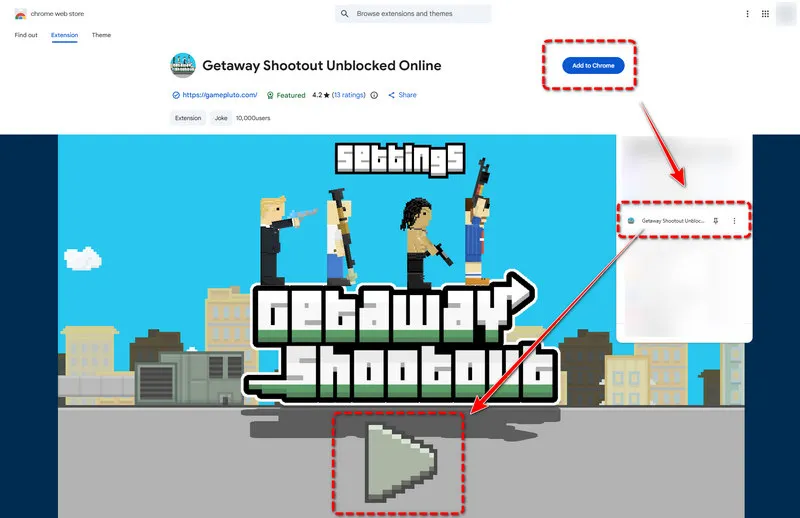
- Step 1: Open Chrome on your school computer and find Getaway Shootout Unblocked Online from the lists.
- Step 2: Click "Add to Chrome" if you are allowed and wait for the extension to install.
- Step 3: Once installed, you can tap the extension icon in the top-right corner.
- Step 4: Then it will automatically jump you into another workable site in a new tab.
- Step 5: Wait for the game to load and play Getaway Shootout unblocked online.
- Step 6: Remember to read controls and use the keyboard to jump right in.
- Easy to try on school computers.
- It has embed games directly in the browser.
- Once added, you can access it quickly.
- Some schools block Chrome extension installation entirely.
- May not work with super strict network firewalls.
- The speed can be slow at peak times.
Method 5. Online VPN
To play Getaway unblocked at school, a VPN is the most reliable way to bypass school network if app installation is permitted. But don't worry, there are some free online VPN, letting you access blocked sites without downloading anything. Similar to Chrome extension, you can use the web interface and then add it to your toolbar, while this still can't work for Chromebooks.
How to Use Online VPN:
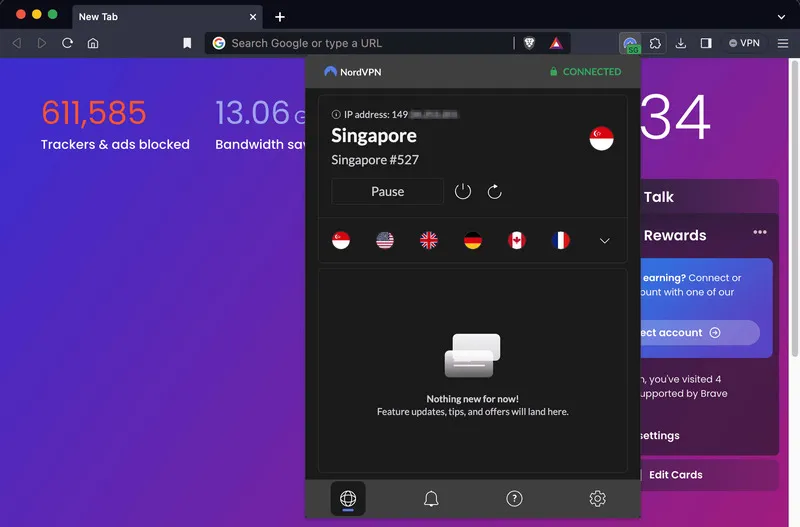
- Step 1: Choose an online VPN extension and add it to school computers.
- Step 2: Click the icon and turn it on.
- Step 3: Select and connect a server location such as US East or West Coast for best gaming.
- Step 4: Once connected, you can open a new tab and go to any Getaway Shootout game site.
- Step 5: Then load the game and play as normal. VPN encrypts your data so your school network won't see what site you are on.
- Works for all gaming sites, not just Getaway Shootout.
- More secure than web proxies, fewer ads and malware risks.
- Online options without complicated setup.
- Some schools block VPN sites completely.
- Won't be available for Chromebooks.
- Free VPNs sometimes may lag when playing fast-paced games.
Part 3: How to Play Getaway Shootout Unblocked on Supervised iPhone or iPad
To play games on school Chromebooks or computers, the key is the ability to access unblocked game sites that bypass school network for now. The same for school-issued iPhones or iPads. But sometimes you notice that these school devices are still controlled even if without school network.
MDM and Screen Time are normally used on school or parent controlled phones. To play Getaway Shootout unblocked on these supervised iOS devices, it is recommended to remove restrictions safely. Syncios Passcode Unlocker offers you a hassle-free solution to remove screen time restrictions when you don't have the password. Besides, all data and settings on your iPhone or iPad will be kept intact. When the phone is controlled by yourself discreetly, you can browse or install whenever you want.
Syncios Passcode Unlocker
- Unlock 4/6-digit code/Face ID/Touch ID all screen lock without password.
- Unlock iPhone Apple ID with one click.
- Recover and reset Screen Time passcode without losing data.
- Remove Screen Time passcode without passcode.
- Support all iPhone models and iOS versions.
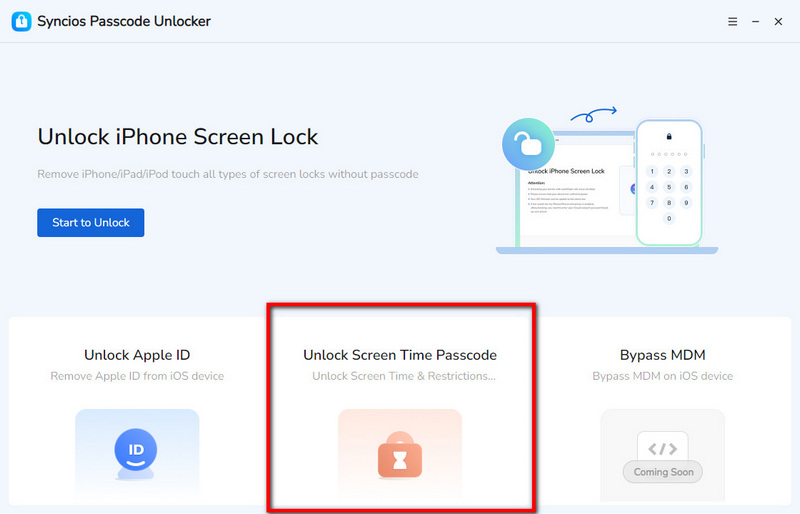
- Step 1: Connect. To play Getaway Shootout or any games on supervised iOS devices, first you need to launch Syncios Passcode Unlocker on your own PC. Next, grab a USB cable, connect your iPhone or iPad to your computer. When it prompts "Trust This Computer", tap "Trust".
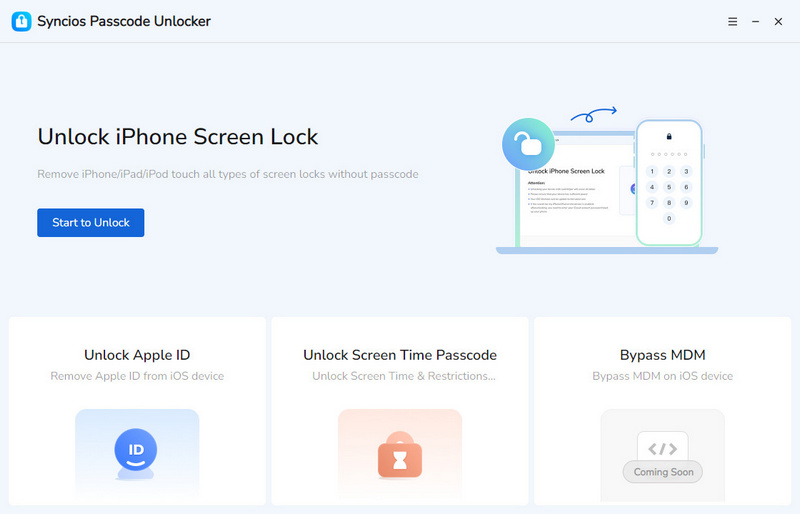
- Step 2: Select. Syncios Passcode Unlocker provides three unlocking modes so far. Click "Unlock Screen Time Passcode" mode.
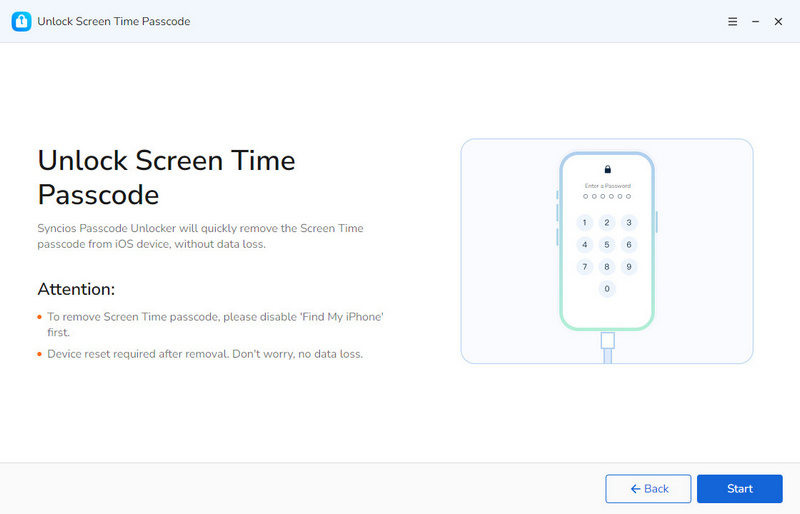
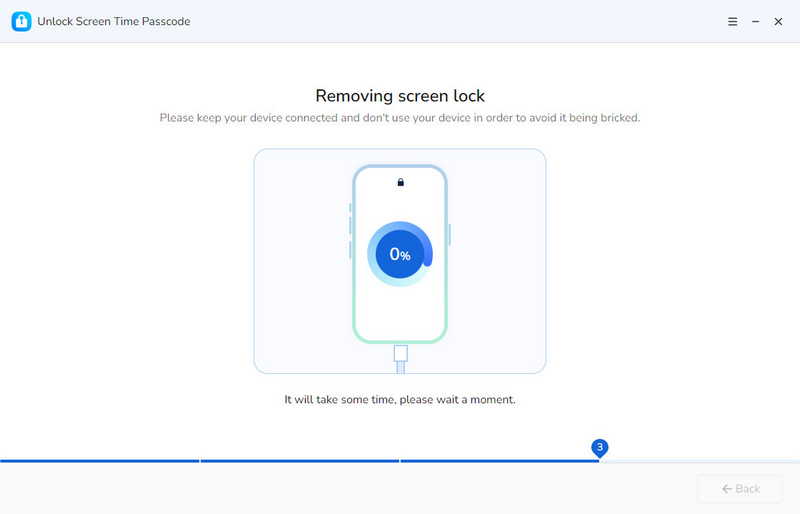
- Step 3: Bypass. No complicated setup. Simply click the "Start" button to remove screen time restrictions.
- During the unlocking process, please make sure the stable connection and wait paciently.
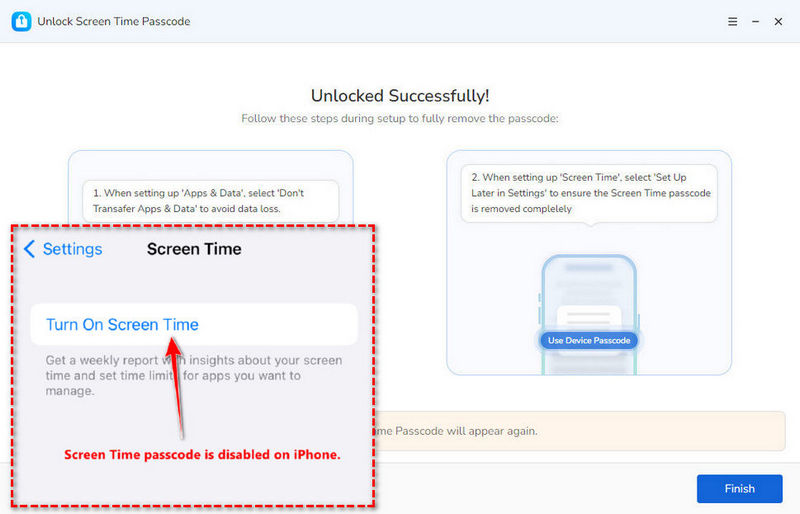
- Step 4: A few moments later, it will notify that the screen time has been removed successfully. You can regain full access to your iPhone or iPad, and play unblocked games without restrictions.
▶️ Video Tutorial:
Part 4: Pro Tips to Win in Getaway Shootout
Getaway Shootout is a fast-paced racing game where you need to jump, grab weapons, shoot and get to the exit first. The clumsy movements and random weapons bring students new chaotic experience in every quick round, making it an ideal game when having short breaks at school. It's funny and casual, but what if you keep falling over and want to be the winner? You need some pro tips espetially for beginners.
1. Controls Mastery
Getaway Shootout is basically a chaotic racing game where everyone keeps jumping and falling with hilarious gestures. Three funny modes are available, but the objective in essence is the same, to get to the exit faster. The character controls on computer are quite different, so mastering the keyboard controls is your foundation to win.
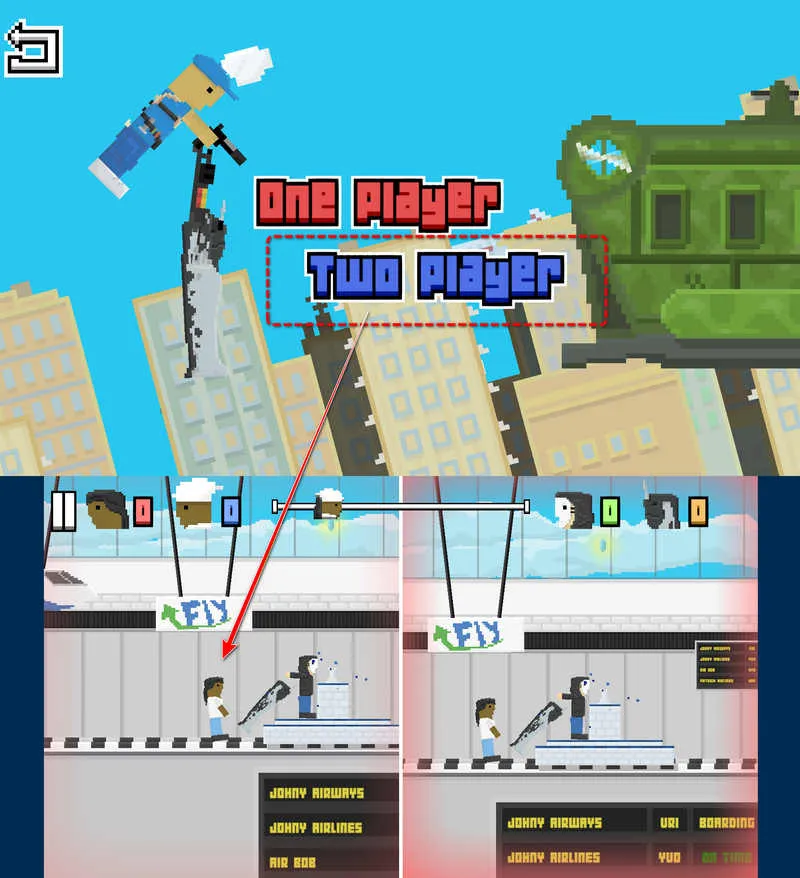
One Player Mode: You play the game by yourself and other online players join the game. You need to defeat all opponents and win first.
Two Player Mode: You play with your friends locally with the same keyboard. Both of you need to compete with each other and one wins.
Time Trial Mode: You play individually on different maps. The goal is to finish the map in the shortest time as you could.
| Controls | Player 1 | Player 2 |
|---|---|---|
| Jump | ||
| Turn | ||
| Power Up |
2. Map knowledge
Being farlimiar to maps helps you avoid traps and go faster, especially when you play Time Trial Mode. There are 8 different maps in Getaway Shootout with distinct locations like Train, Tower, Terminal, Plane, Moon and more. All players will encounter each map in order. So basically you just need to run all maps over and over again, you will master the constructions and details. Practice makes perfect.
3. Weapon Selection
Weapons are generated randomly every round. Whether you are leader or falling behind, don't forget to use different weapons to shoot other players. Sniper and Bomb can cause the most damage to your opponents. Besides, if you are shot, you can use a First Aid Kit to heal yourself.
Part 5: Best Alternatives to Getaway Shootout
If unfortunately, Getaway Shootout is entirely blocked and none of these online methods are useful, you still have backups. You can search and play these unblocked games through crazygames.com and poki.com platforms.
1. Rooftop Snipers
This is the closest you will get to Getaway Shootout’s vibe. It also features pixel graphics and shooting physics where you and a friend battle on top of buildings, using snipers and melee weapons to knock each other off. Highly recommended.
2. Ragdoll Archers
Similar to Getaway Shootout, Ragdoll Archers is also a popular physics-based action game supporting PvP mode. You can use bows to shoot your opponent while managing the movement. Meanwhile, you can upgrade your health and damage resistance against enemies.
3. Stickman Hook
Stickman Hook is a fast-paced racing and puzzle game where you swing through levels using a grappling hook. It's simple but difficult to control well, so if you like the clumsy movement in Getaway Shootout, you will also love this.
FAQs About Getaway Shootout Unblocked
The simplest and most direct way to play Getaway Shootout unblocked online is to visit unblocked game sites. No VPN or extension, all you need is to find new sites that are not blocked by school network yet. Try these unblocked sites on Part 2.1.
To access Getaway Shootout unblocked safely, without ads or malicious content, https://poki.com/en/g/getaway-shootout and https://www.crazygames.com/game/getaway-shootout are most popular and reliable platforms. However, they are so mainstream that school usually blocks the domain. There are other good options but you need to watch out for potential pop-ups. Thus, suitable site is the best one.
Yes. Using unblocked game sites and web proxy can help you play Getaway Shootout unblocked on a Chromebook.
Final Words
Whether you are playing solo or with a friend, Getaway Shootout is all about having fun. 5 online methods are provided in this article, from new unblocked game sites that work on Chromebooks, to safe options using extensions, you can enjoy the gameplay when you want a break. If you have an iPhone or iPad handy but can't access Safari or Chrome, use Syncios Passcode Unlocker to discreetly remove screen time restrictions and visit game sites you want.
What's next? Download Syncios Passcode Unlocker now!

Ethan Mercer | Senior Writer
Related Articles
Related Solutions

Remove iPhone screen passcode, Apple ID, Face ID, and more in minutes.