>
How to >
>
How to >
How to Play Pokémon Games Unblocked at School
Hey, trainers! Catching, battle, adventure. Pokémon games have earned widespread popularity worldwide. If you also love Pokémon, it must be very tough when you have to be stuck at school. Sometimes when you finish work early, have a lunch break, or have a free period, and all you want is to play a little Pokémon.
But obviously, school WiFi system will block gaming sites and emulators, making it difficult to enjoy your favorite games even for a few minutes. We have you covered. In this article, we will show you 5 feasible methods to play Pokémon games unblocked at school. If you are using restricted iOS device that prevents you from games, you can find a solution here. This guide also provides a bonus tip for Pokémon Go players. Let's dive in!
Part 1: 5 Methods to Play Pokémon Games Unblocked at School
To bypass school network, this part introduces 5 methods to play Pokémon games unblocked at school. Some can work on Chromebooks, while others only do the job if your school network is not very strict. Each one has its own strengths and weaknesses. Refer to the following comparison table, so you can quickly decide what method best suits you.
| Pokémon Games Unblocked | Unblocked Effectiveness | Time to Work | Ease of Use | Best For |
|---|---|---|---|---|
| 1. Unblocked Pokémon Game Sites | ⭐⭐⭐ | Immediately | Easy | Best for simple gameplay, quick short sessions |
| 2. Online Emulator | ⭐⭐⭐ | Fast | Medium | Play full classic Pokémon games |
| 3. VPN or Proxy | ⭐⭐⭐⭐ | A little slow | Medium | When you can't access unblocked Pokémon game sites or online emulators |
| 4. Mobile Hotspot | ⭐⭐⭐⭐⭐ | Immediately | Easy | Bypass school network completely without relying on school WiFi |
| 5. Portable Emulator from USB | ⭐⭐⭐ | After setup | Harder | Offline long play |
Method 1. Unblocked Pokémon Game Sites
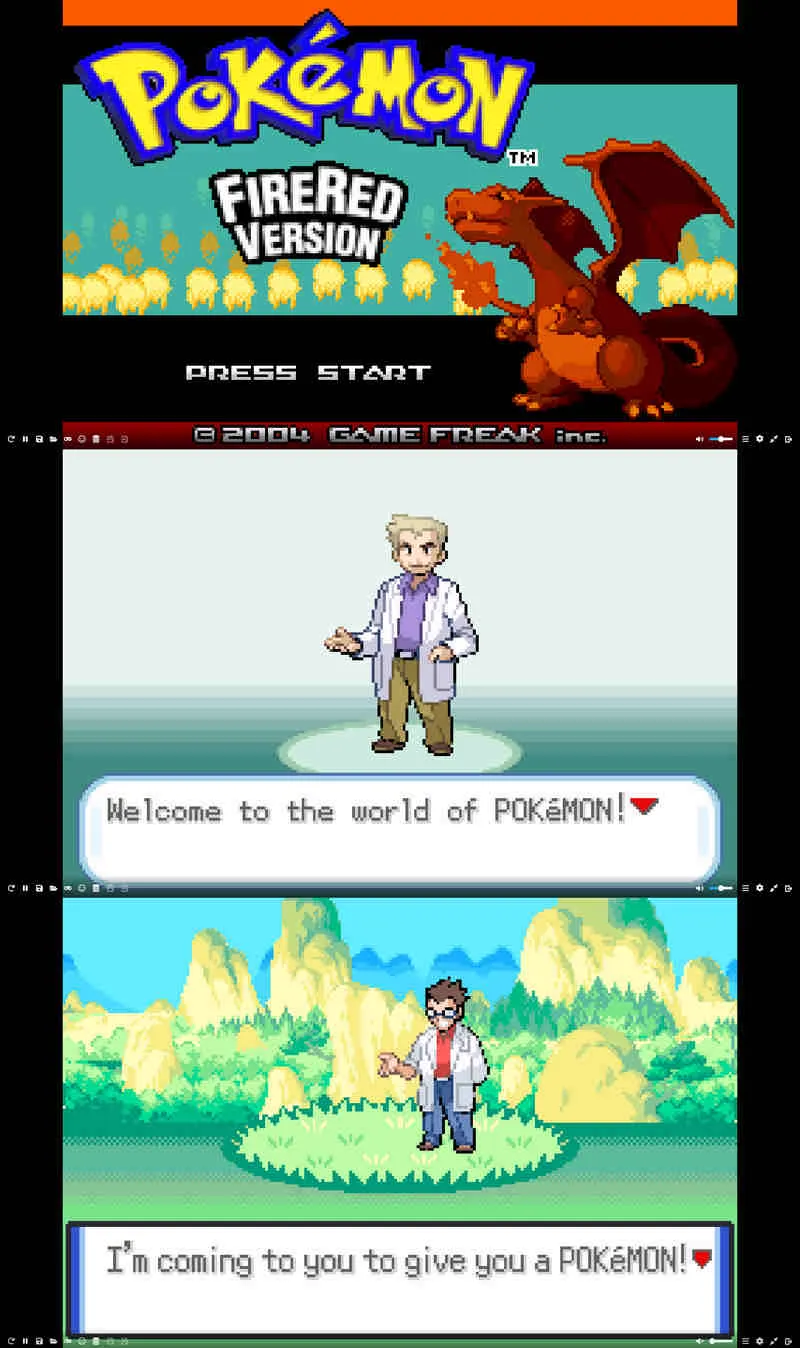
To play Pokémon games unblocked, visiting unblocked game sites is the most direct and easiest method. Some Pokémon game sites are equipped with a built-in emulator, and you don't need any special permissions or download anything, all you need to do is open these unblocked sites in any browser on school computers or Chromebooks. School is unable to block every single gaming platform, so these often slip through the filters. But they are not permanently unblocked, try the following sites before schools block them.
🔥You May Also Need: Top 11 Unblocked Browsers for School
🔗 Unblocked Pokémon Game Sites:
- https://unblockedgames.techgrapple.com/pokemon-firered-gba/
- https://sites.google.com/view/classroom6x/pokemon-emerald
- https://www.y9freegames.com/game/pokemon-valiant/
- https://sites.google.com/view/unblockedgamesxl/pokemon-gaia
- Very easy to use and play.
- Works on Chromebooks and school computers.
- No need to hide or install programs.
- Not all unblocked sites have full official titles.
- Some pop-ups may interrupt your game experience.
- Sites can get blocked suddenly by schools.
Method 2. Play Pokémon Games Unblocked on Online Emulator
Not all unblocked game sites have built-in emulators and official Pokémon titles, so if you seek the best gameplay, online emulator is your top choice to play Pokémon games unblocked at school. Online emulator also avoids any installation and runs right in your browser, you can play real Pokémon games like FireRed, Emerald, Platinum, HeartGold, or Black/White.
🔗 Online Emulator Sites:
- https://emulatorgamer.com/
- https://classicgamezone.com/games/pokemon-sapphire
- https://www.webmulator.com/games/nintendo-ds/pokemon-heartgold
- https://www.pikawiz.com/pokemon-pack-simulator
- https://pokemonshowdown.com/
- https://www.pokemon-vortex.com/
How to Use Online Emulator:
- Step 1: Open a browser on your school computer or Chromebook.
- Step 2: You can visit a trusted online emulator site. (Above links can be your good options.)
- Step 3: Look for the Pokémon game you want to play.
- Step 4: Click the play button and wait a few seconds for it to load.
- Step 5: Use your keyboard to control and enjoy the game.
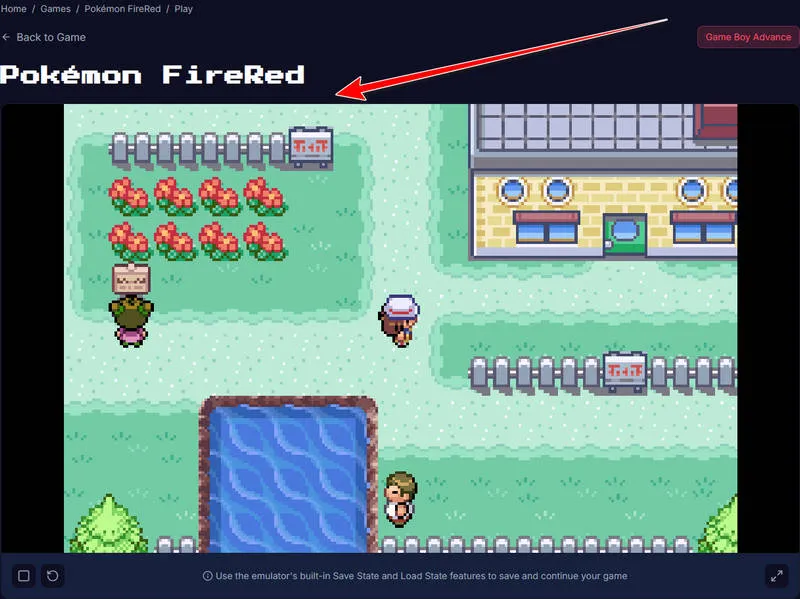
- You can play full official Pokémon games.
- You can use Save State to save your progress.
- No local emulator installation or Pokémon ROM download, works for school devices.
- Can lag a little on older computers.
- Some schools block emulator websites completely.
- Keyboard controls feel a bit awkward at first.
Method 3. Use VPN or Proxy
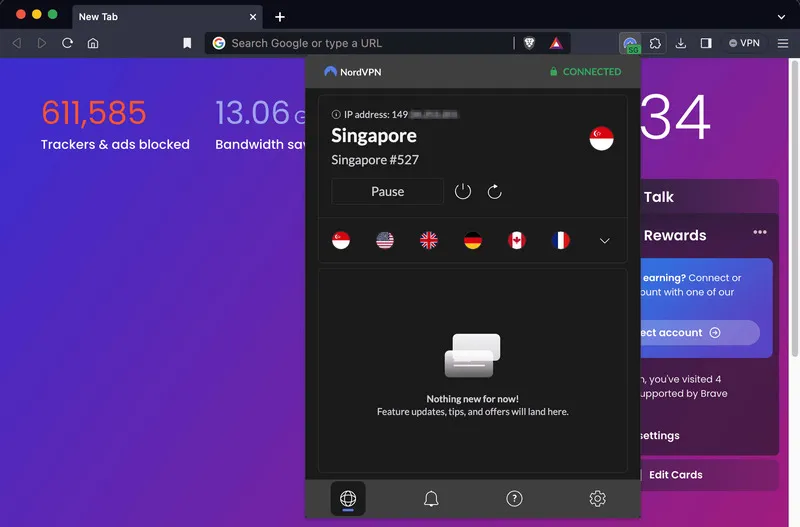
If unfortunately, your school blocks both game and online emulator sites, VPN (Virtual Private Network) or proxy can mask your IP address and help you bypass school content filters. But .exe is often forbidden by most school computers, so you can try VPN extension and web proxy to play Pokémon games unblocked at school.
How to Use VPN or Proxy:
- Step 1: You can choose a free online VPN or proxy.
- Step 2: Add the extension to your school computer if allowed.
- Step 3: Turn it on and connect to a nearby server.
- Step 4: Then open one of the unblocked Pokémon game sites or online emulators. Enjoy the game.
- Step 5: If one server doesn't work, just try switching to another.
- Unblocks most restricted sites.
- Works with any Pokémon game or emulator.
- Hides your activity from the school network.
- Free VPNs or proxy can be slow.
- It might not be stable enough for smooth gameplay.
- Some online VPNs are blocked too.
Method 4. Use Mobile Hotspot
When above three methods fail to help you get Pokémon games unblocked for school, use your personal hotspot. This method is quite simple and bypass school network entirely, necause school can't set content filters for your own WiFi. If you are allowed to bring a phone to school and have enough data, you can just turn on a hotspot to connect with school computer, then you can enjoy Pokémon games without interruptions.
How to Use Mobile Hotspot:
- Step 1: On your Android/iOS phone, open settings and turn on mobile hotspot.
- Step 2: Remember to set a password so no one else joins.
- Step 3: Next connect your school computer to your own WiFi.
- Step 4: Now you can open game sites or online emulator on a browser and start playing.
NOTE: Playing Pokémon games directly on your phone when you break at school is also a good choice. You can download the mobile emulator and Pokémon ROM on your device, which is the most stable way compared with online emulators and game sites. If you have a restricted device that blocks any game downloads or setting changes, just remove Screen Time quickly, and then enjoy gameplay!
- Will not be controlled or blocked by schools.
- Fast and stable connection.
- Works with any game or emulator.
- Uses your cellular data.
- Drains your phone battery faster.
- Not helpful if your phone is restricted from changing settings.
Method 5. Run Portable Emulator from USB
There is another solid way to play Pokémon games unblocked at school, without relying on school network at all. You can use the portable emulator, which can run directly from a USB drive, also put ROM on a USB flash drive, and theoretically, there will be no traces left if you play on school computers. As long as you set everything up at home, you can play any Pokémon game offline. Schools prohibit installing software, but they don't necessarily forbid running programs from USB drives, so this is a method worth trying.
How to Run Portable Emulator from USB:
- Step 1: First when you are at home, download a portable emulator on your computer and copy it to a USB drive.
- Step 2: Then put your Pokémon ROMs like FireRed, Emerald, Platinum, HeartGold, and Black/White on the same drive.
- Step 3: When you are at school, plug the USB into your school computer.
- Step 4: Open the emulator directly from the USB.
- Step 5: Load your game and play without WiFi.
- Offline gameplay and keep your progress.
- Play any GBA or NDS Pokémon game.
- Very convenient without installation.
- You have to prepare everything at home.
- Not suitable for Chromebooks and some schools block USB drives.
- Teachers might notice if they walk by.
Part 2: How to Play Pokémon Games on iPhone/iPad Without Restrictions
If you find that even if you get rid of school environment, you still can't access games like Pokémon, it's not the problem of network, the device restriction instead. Whether for the school-issued iPhone/iPad, or parent-controlled devices, Screen Time and MDM (Mobile Device Management) won't allow you to visit sites, install apps, and play games as you like.
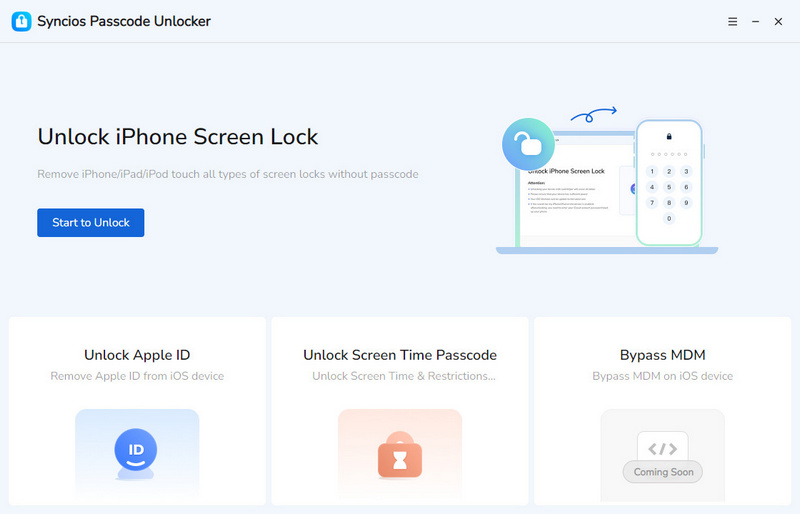
So to play Pokémon games on a restricted iPhone or iPad needs to remove Screen Time. Syncios Passcode Unlocker right here provides you a hassle-free solution to remove screen time passcode without knowing the password. It is friendly to beginners, letting you regain full access to iPhone or iPad and browser content you like. Besides, screen time removal will not cause any data loss, and it's no jailbreak. If you are interested in trying, see how it helps you play Pokémon without restrictions below.
Syncios Passcode Unlocker
- Unlock 4/6-digit code/Face ID/Touch ID all screen lock without password.
- Unlock iPhone Apple ID with one click.
- Recover and reset Screen Time passcode without losing data.
- Remove Screen Time passcode without passcode.
- Support all iPhone models and iOS versions.
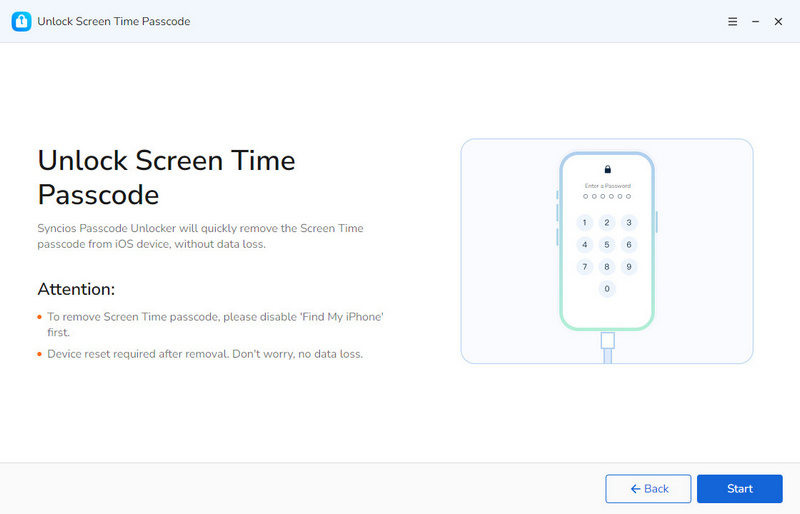
- Step 1: Connect.
- First you need to launch Syncios Passcode Unlocker on your computer, and then connect your restricted iPhone or iPad to the PC using a USB cable.
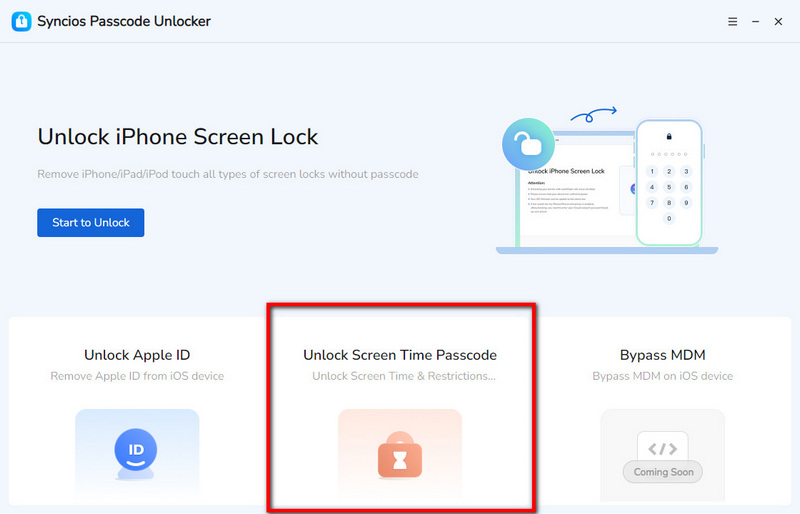
- Step 2: Select.
- Click "Unlock Screen Time Passcode" mode in the maininterface.
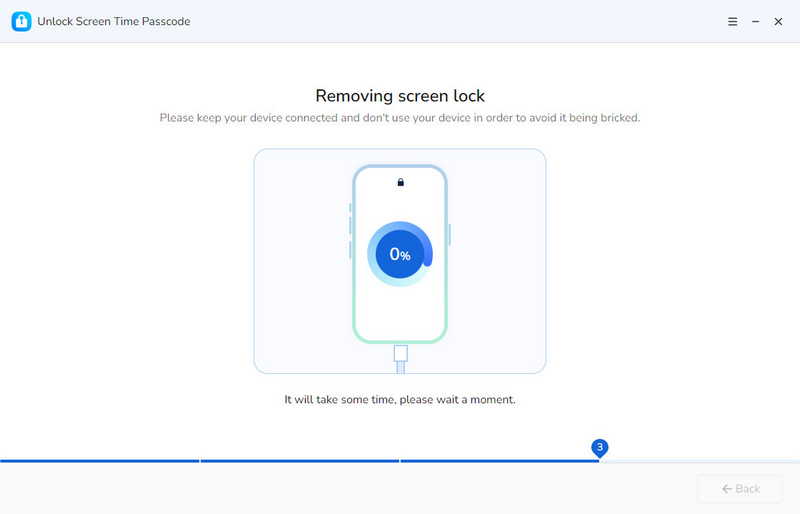
- Step 3: Bypass.
- Click the "Start" button to remove screen time restrictions.
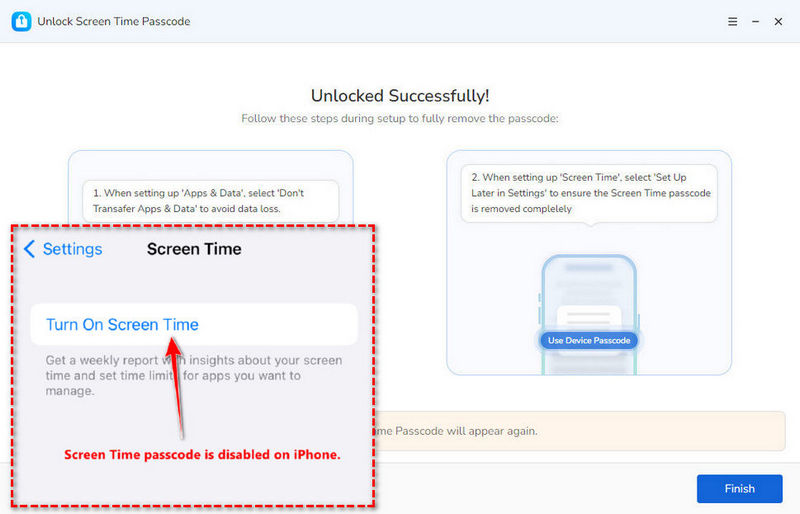
- Keep your device well-connected to your computer and wait patiently. The removing process will not take too long.
- Step 4: When screen time is removed, your phone will restart and then you can download emulator and ROM to play Pokemon games.
▶️ Video Tutorial:
Part 3: Top Pokémon Games to Play on Emulator
In this part, we will recommend top 5 Pokemon games that is worth playing on emulator. These emulated GBA/DS games can run different on school online emulators. Some are more stable, some have more content, and some just feel better to play.
1. Pokémon FireRed/LeafGreen
Pokémon FireRed is the most classic game, very suitable for beginners. As a modern optimized version of the first generation, it has the most classic content and requires no technical skills, so it can run smoothly on any computer. Additionally, the map design is very clear, you won't get lost. You can just catch Pokémon, level them up, and then challenge gyms, with no complicated content. Highly recommended!
2. Pokémon Emerald
Pokémon FireRed is the "beginner," Emerald is the "advanced". If you are willing to challenge, this title is recommended. Its map is more explorable, and the battles are more varied. More importantly, it unlocks the Battle Frontier after completion, which attracts more players and makes it very popular.
3. Pokémon Platinum
A lot of fans call this one of the best Pokémon games ever made. Pokémon Platinum is one of the most challenging main storylines, with strong Gym Leaders, Elite Four members, and Champion Cynthia, requiring more strategic team composition. The climax of the story is very creative, and the visual style are excellent. Playing this version on an emulator is also a great option.
4. Pokémon HeartGold/SoulSilver
Pokémon HeartGold/SoulSilver is amazing remakes with tons of extra content. And the Pokémon will follow you around, which really brings back a lot of nostalgia. You can run it smoothly on emulators.
5. Pokémon Black/White
The reason this title is one of the top Pokémon games is that it has the best story in the series, focusing on N and Team Plasma, making it the most thought-provoking generation. Its Pokémon designs may also offer you a fresh experience.
Bonus Tip: Can You Play Pokémon GO Without Actually Moving?
The Pokémon series keeps emerging endlessly, and the AR game Pokémon Go has fascinated many people. If you also play Pokémon Go, want to catch more rare Pokémon and level faster without leaving home, you need this reliable Pokémon Go spoofer.
Syncios Location Changer is designed to change iOS and Android GPS location with one click. You can also use this professional tool to spoof a virtual location in various apps, including Pokémon Go, Life360, SnapChat and more. It allows you to simulate the real GPS movement in games, creating customzied route and speeds. With this location spoofer, you can go abroad or explore places you can't go to catch rare Pokémon, participate in distant raid and level faster. Most importantly, Syncios Location Changer has the Cooldown Timer, which avoids Error 12 or account suspension by Niantic.
 Syncios Location Changer
- Instantly spoof your GPS location to any spot in the world with just one click.
- Create customized routes and set walking/jogging/driving speeds to mimic real GPS movement.
- Support for all location-based social and dating apps like Facebook, Snapchat, and Tinder.
- Ideal for games like Pokémon GO to catch more Pokémon in different areas.
- 360-degree joystick offers precise, lag-free control for a more immersive experience.
- Safe to use, requiring no jailbreak or root.
- Compatible with the latest iOS and Android versions.
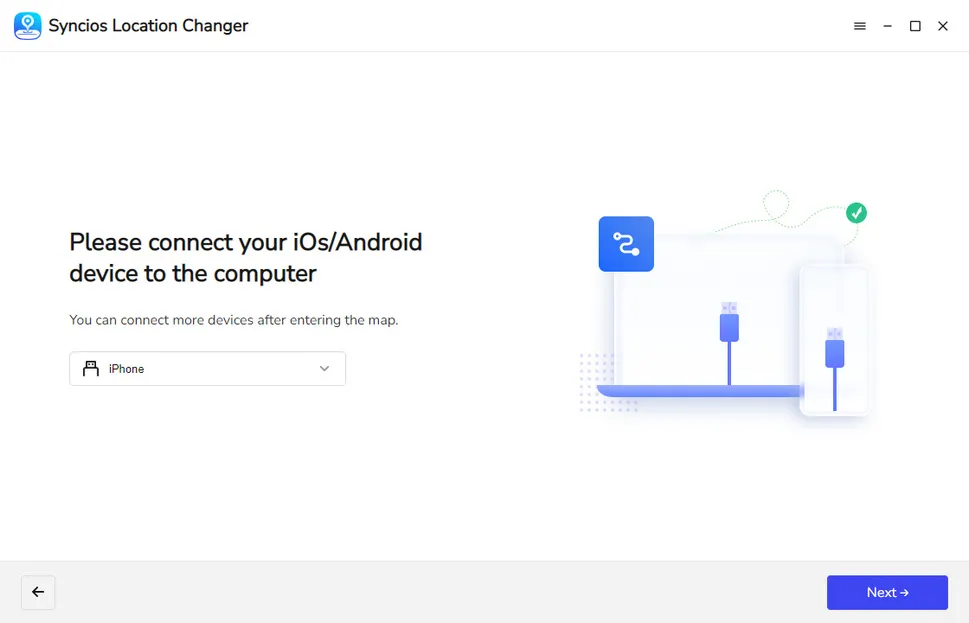
- Step 1: Launch Syncios Location Changer on your computer and connect your phone to PC via a USB cable. For iOS users, you will see the following interface, click "Next" to spoof your Pokémon Go location. For Android users, you can choose the "Game Mode" for Pokémon Go.
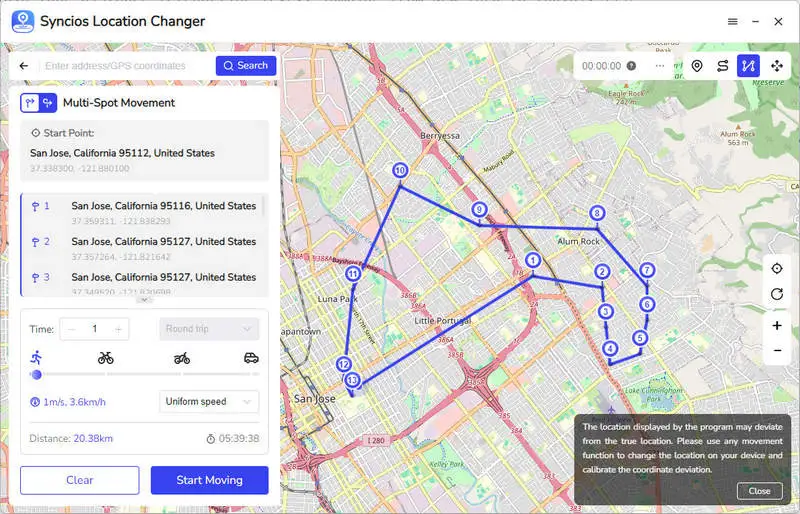
- Step 2: Choose the "Multi-spot Mode" in the upper right corner and set your destination as the possible Pokémon spawn points. Then, you can also create a reasonable speed for walking or running.
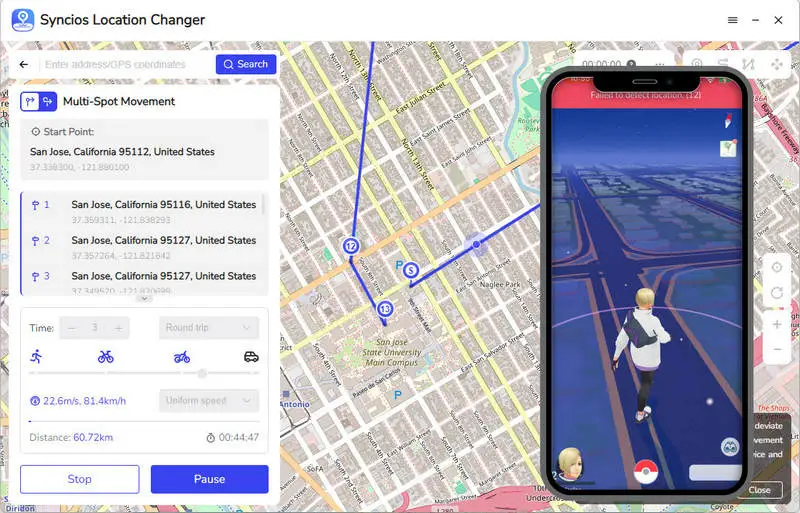
- Step 3: Open Pokémon Go on your phone, you will see the trainer is moving along with the route you set before.
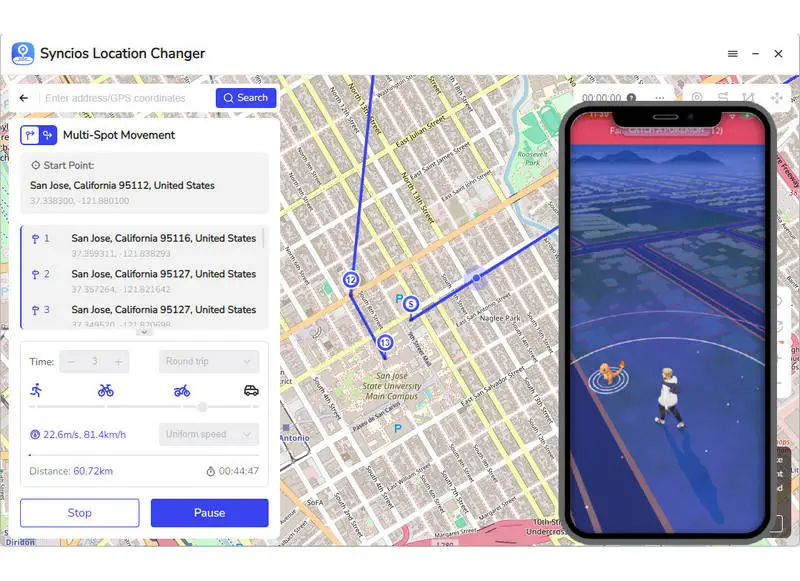
- Step 4: When you encounter a Pokémon, you can catch it now.
▶️ Video Tutorial:
FAQs About Pokémon Games Unblocked
School is where education flows, so they will block any game or entertainment sites including Pokémon, to keep students focused on class. Besides, to avoid unnecessary resource consumption and save internet bandwidth, school WiFi system disallows unrelated access requests. Students safety is also considered as one of the reasons for school blocks Pokemon. Emulator and Pokémon game sites may contain malicious content and ads, which are not suitable for students.
The Pokémon series is very exciting, and the best episodes vary from person to person. If you use online emulators, almost all official Pokémon titles are worth playing unblocked at school.
FireRed/LeafGreen is highly recommended because it's classic and best for beginners, while Emerald is a little challenging for new players but suitable for old players. HeartGold/SoulSilver is also recommended for its positive reviews. These titles can load quickly on school browser and run smoothly compared to other complicated versions.
Emulators themselves are legal, but ROMs of games are kind of gray. Downloading Pokémon ROMs you don’t own is against copyright laws, even if you have a physical cartridge. But in fact, there are still many players who download ROMs and don't care about this. What you should note is that some emulator sites or ROMs have bad ads or malware, so you have to be careful which links you click.
Final Words
A quick Pokémon session during a free period is happy. This article walked you through 5 effective methods to play Pokémon games unblocked at school, most of which are online options. Whether for Chromebooks or school computers, there is one suitable way for you. As for the restricted iPhone or iPad by screen time, it is recommended to use Syncios Passcode Unlocker to remove restrictions and enjoy gameplay whenever you want. If you play Pokémon Go and want to level up without actually moving, just try a location spoofer.
What's next? Download Syncios Passcode Unlocker now!

Ethan Mercer | Senior Writer
Related Articles
Related Solutions

Remove iPhone screen passcode, Apple ID, Face ID, and more in minutes.